Sending a short fast video of motion to Telegram example

When an action is triggered, it runs the following script which creates a short 3 second video with the motion sped up to provide a quick summary of what caused the trigger (essentially a time-lapse over 10 seconds). It sends this to Telegram which autoplays the video when viewing it.
It does this by capturing 50 photos every 0.2 seconds, and then converting them into an mp4 video
I'm posting the code here in case it helps others.
You will need to have set up a Telegram bot (https://core.telegram.org/bots) and have installed ffmpeg using brew (https://brew.sh).
(apologies that all the code shows with no indents, I tried using spaces but this forum still flattens the code. However, if you copy this and paste into the Apple script editor and then save, it will automatically indent all the code for you)
on run args
--set cameraNum to "1"
--set cameraName to "BackCam"
--set reason to "Manual"
set cameraNum to item 1 of args
set cameraName to item 2 of args
set reason to item 3 of args
--Adjust folder path, telegram bot, and chatid details here
set folderName to "/Users/paul/SecuritySpy/MotionVid/" & cameraName
set repeatCount to 51
set tokenurl to "https://api.telegram.org/bot12345678:AAAAAAaaaaAAAAAaaaaaAAAAAaaaaaAAAA"
set chatid to "1234567"
set videoFile to folderName & "/video.mp4"
do shell script "mkdir -p " & folderName
--Send a Telegram message to notifiy motion has been detected
do shell script "curl -s -X POST " & tokenurl & "/sendMessage -d text=''" & reason & "' detected on '" & cameraName & "'' -d disable_notification=true -d chat_id=" & chatid
--Collect photos
set i to 1
repeat while i < repeatCount
set fullFilePath to folderName & "/image_" & i & ".jpg"
try
tell application "SecuritySpy"
capture image camera number cameraNum as fullFilePath with overwrite
end tell
on error
--Try again after a slight delay
delay 0.2
try
tell application "SecuritySpy"
capture image camera number cameraNum as fullFilePath with overwrite
end tell
on error
--Remove existing file if it fails again
try
do shell script "rm " & fullFilePath
end try
end try
end try
set i to i + 1
delay 0.2
end repeat
--Reduce photo size
set i to 1
repeat while i < repeatCount
set fullFilePath to folderName & "/image_" & i & ".jpg"
if FileExists(fullFilePath) then
do shell script "sips -Z 1280 " & fullFilePath
else
--if file is missing due to capture error, copy from previous file because ffmpeg errors if one is missing
set oldi to i - 1
do shell script "cp " & folderName & "/image_" & oldi & ".jpg " & fullFilePath
end if
set i to i + 1
end repeat
--Convert photos to an mp4 video
if FileExists(videoFile) then
do shell script "rm " & videoFile
end if
do shell script "/usr/local/bin/ffmpeg -framerate 15 -start_number 1 -i " & folderName & "/image_%d.jpg -c:v libx264 -profile:v high -crf 20 -pix_fmt yuv420p " & videoFile
--Send video to Telegram
if FileExists(videoFile) then
do shell script "curl -s -X POST -H 'Content-Type:multipart/form-data' " & tokenurl & "/sendVideo -F disable_notification=true -F chat_id=" & chatid & " -F video=@" & videoFile
end if
end run
on FileExists(theFile) -- (String) as Boolean
tell application "System Events"
if exists file theFile then
return true
else
return false
end if
end tell
end FileExists
Comments
-
Many thanks for posting your code, this is very helpful! Glad to see you were able to implement this, it looks like a useful function.
-
Yes Tks
-
Paul
Thank you very much for sharing/posting this code. It accomplishes both its original purpose well and a nice foundation on which to build out code for other uses.
-
Hi Paul, thanks for sharing what I've been trying to do for some time and yet to no avail.
Could you help me look for the error?
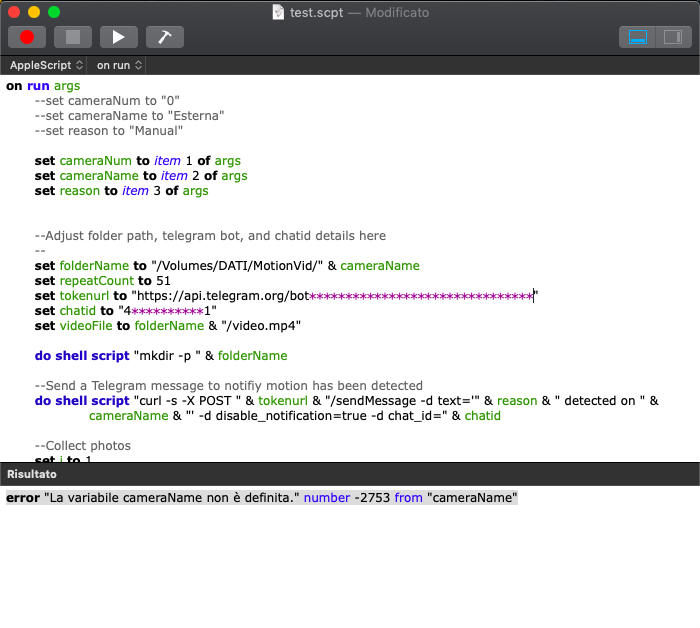
I currently work in security spy with only one cam (num 0) and her name is "External". While compiling the script I find an error. Can you help me soon?
-
Hi @Niko ,
If you're running the script outside of security spy you need to define the cameraNum/Name/reason variables so that it knows which ones to use. If running from security spy these values are supplied by the software and picked up via the "args" variable.
e.g. The top few lines should look like this if you are running the script by itself. Remember to swap the commented out lines back around after testing.
on run args
   set cameraNum to "0"
   set cameraName to "Esterna"
   set reason to "Manual"

--set cameraNum to item 1 of args
--set cameraName to item 2 of args
--set reason to item 3 of ar
-
Hi @Niko, I'm not sure how but your reply to this ended up within my profile feed, and my reply to that didn't go anywhere, so I'll reply here.
You asked:
"Hi Paul, thanks for your reply. A small step forward has been made. Now, however,
still during compilation, it tells me:
permission deneid on the path /Users/admin/SecuritySpy/MotionVid
My reply was:
can you create files manually in that folder?
Using the terminal program on macOS, can you run the following and copy the result back into here?
ls -al /Users/admin/SecuritySpy/MotionVid

