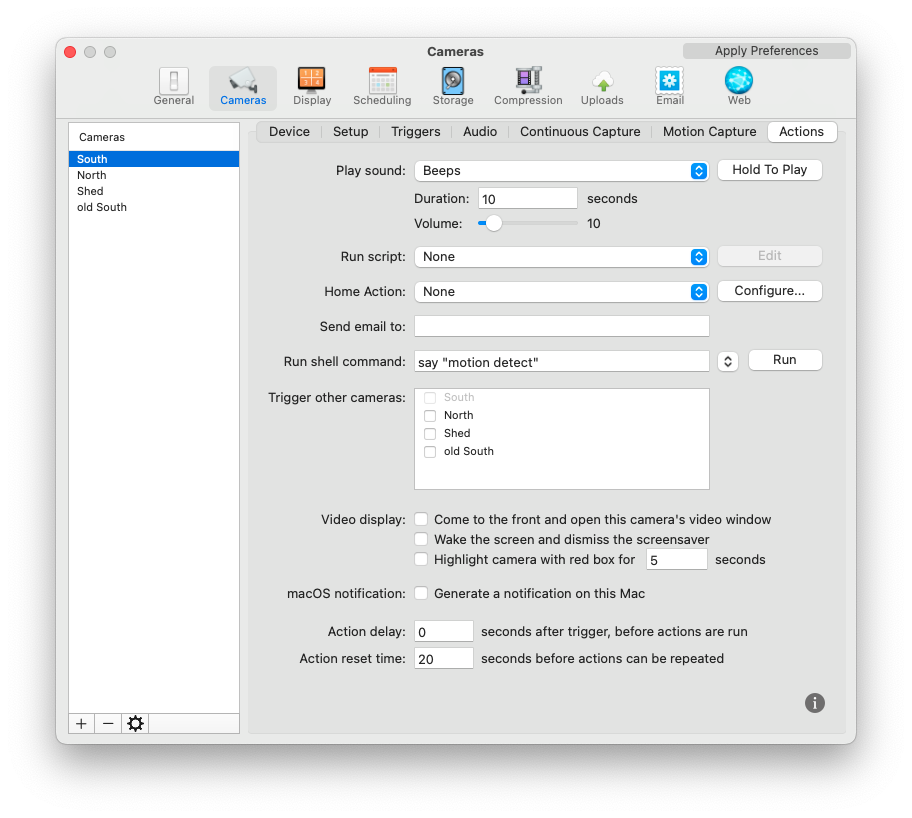
Configuration / Cameras / Actions / Play sound + Run shell command

Recently updated from Monterey to Ventura. Play sound on motion trigger no longer working. Is there something in Ventura that requires a setting.

Comments
-
Nothing special needs to be set in Ventura, and we haven't heard of any specific problems with the sound action in this system version. The things to check are:
- Check that the Mac's audio volume is set to a level where you can hear sounds.
- If you press and hold the "Hold To Play" button in the above window, do you hear the sound?
- Make sure that Actions mode for this camera is armed on a suitable schedule (e.g. "Armed 24/7"). If set correctly, the "A" indicator for this camera shown in video window and the Camera Info window should appear as orange, and should turn red when motion is detected.
-
My apologies. Should have mentioned a tick against all of these. [Hold to play]: get plenty of sound. Same for [run].


Curious! Was working prior to update.
-
So, set up a completely new South (not using Duplicate or Copy all) and all is well. Go figure!
-
In your screenshot above, the "M" indicator is orange/red, but the "A" indicator is grey, indicating it is unarmed. M stands for Motion Capture while A stands for Actions, so I think this explains the problem. In any case, I'm glad you got it working by recreating the camera (when you do this, both M and A are on the "Armed 24/7" schedule by default).


