Multiple copies of same camera uses more CPU?

Background:
In order to get different behaviours for night vs day I have cloned the same camera and setup a day version and a night version. In the daytime (sunrise to sunset) the C/M/A (Continuous capture, Motion capture, Actions) capabilities are turned on for the day camera and then turned off at night (sunset to sunrise). Then there is another version of the same camera with the opposite (on from sunset to sunrise). The first does not execute any automations for lights vs the second (night camera) turns on certain lights.
Observation:
SecuritySpy still runs that cameras regardless of the C/M/A status and is therefore using CPU resources.
Question:
Is there a way to have the camera turned off when neither C, M, or A are active?
Comments
-
There is no way to have the idle camera "turn off" automatically, but the main task that uses system resource is the decoding of the incoming video stream, so to avoid this being duplicated, what you can do is turn on the option at Preferences > General > Decompress incoming video only when required.
Just make sure that the idle camera instance isn't actually being used for something (e.g. live video display or streaming via the web interface), and once decoding has been suspended it should use virtually no system resources.
-
Thanks Ben,
Here is what my system looks like with the "Decompress incoming video only when required" toggle not enabled.
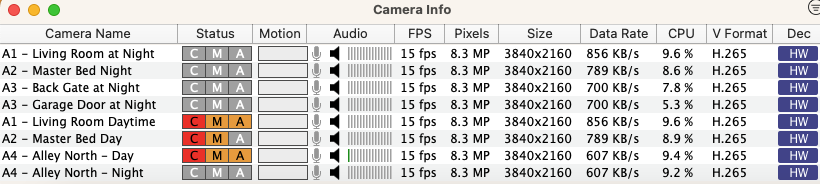
Interestingly, when I toggle that setting it appears to have very little, if any, effect on the CPU load. This is that I show after turning on the "Decompress incoming video only when required" toggle.
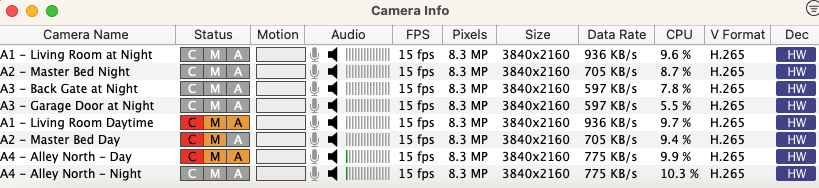
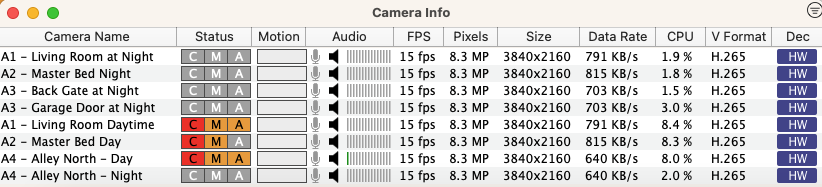
When I added the "Perform motion detection only when required" though, it definitely has an impact (I did need to wait a ~10 seconds to see the total change). The fact that "A3 - Garage Door at Night" still has a load is interesting (this is the same camera as "A3 - Back Gate at Night" but with a different trigger area and no email sent out).

I don't know what the consequences of this option would be though. It certainly sounds like not a concern to use, and the reduced CPU load would make sense. Is there something else that I should consider with this option?
For interest, turning off "Decompress incoming video only when required" and leaving "Perform motion detection only when required" turned on resulted in the following.
-
Decoding is required for motion detection, so this is why you see an interaction between these two options.
I'd recommend you update to the latest beta version of SecuritySpy (currently 5.5.4b3), as this will provide you with a clearer indication of which cameras are currently performing decoding and which aren't. Cameras currently doing decoding will have a purple "SW" or "HW" indicator in the Decoding column in the Camera Info window (indicating software-based decoding or hardware-based decoding), while cameras that not currently performing decoding will now display a grey indicator in order to provide clearer feedback of this state.
If you still see some CPU usage reported with cameras that aren't performing decoding, this must be some other tasks associated with that camera, however this should always be a low amount.
