Ventura upgrade issues?

Hello!
I'm wondering if you found that Ventura causes more overhead than previous versions of the software? I upgraded to Ventura yesterday, and ever since I have been getting "A significant number of video frames could not be decoded due to decoder overload." sporadically throughout the day.
I never received this error before the upgrade to Ventura. The Mac in question is a Mac mini 2018, and SecuritySpy is the only software on the machine.
Comments
-
It will be interesting to see if other users are also seeing this problem. The only possibly cause for this message is that the video decoder (which is built into macOS, and accelerated by the Mac hardware) can't keep up with decoding the rate of video frames that SecuritySpy is sending to it. We have seen some such performance differences between system versions over the years but these have generally been small, so hopefully Ventura won't be significantly less efficient at this task compared with previous system versions. My suggestion to you would be to reduce your camera frame rates by a small amount - if the message is currently sporadic, you shouldn't have to reduce them too much to avoid this issue.
-
Thanks for the info. I'm anxious to hear from anyone else as well. It is possible I was RIGHT at the threshold of the limit of my system, maybe...?
I do remember seeing that message before, but I think it was only one single time, over the course of more than a year with the same camera/system setup.
Since upgrading to Ventura, I am getting it about 10-12 times per day.
-
I"m running a 2018 Mac mini with 32 cams and no problem.
-
Ive upgraded to Ventura on a client Mac not my main server where SS runs. I still use SS on the client Mac to view my SS server and haven't had issues but I dont know if that's the same thing because its simply feeding of the server machine
-
@keness ,
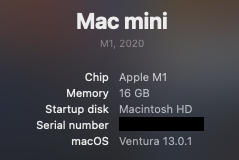
I have a 2018 Mac Mini as well and am contemplating making the move to Ventura. Can you shares more on the spec of your machine?
My machine is a 3 GHz 6-Core Intel Core i5 with 16Gb of 2667 MHz DDR4 RAM. Not sure if this will have any impact on performance limits. Don't know if this would have any impact on the video decoder keeping up. Might be good to know though.
-
I can share some benchmark results that we have for these 2018 Mac minis, in terms of the maximum total rate at which they can decode various video streams:
Decode 2K H.264: 720-820 fps
Decode 4K H.264: 210-250 fps
Decode 2K H.265: 560-640 fps
Decode 4K H.265: 260-290 fps
The reason for the range is that there are different models of 2018 Mac mini with varying performance - here is the order in terms of lowest to highest performance:
4-core 3.6 GHz i3
6-core 3.0 GHz i5
6-core 3.2 GHz i7
-
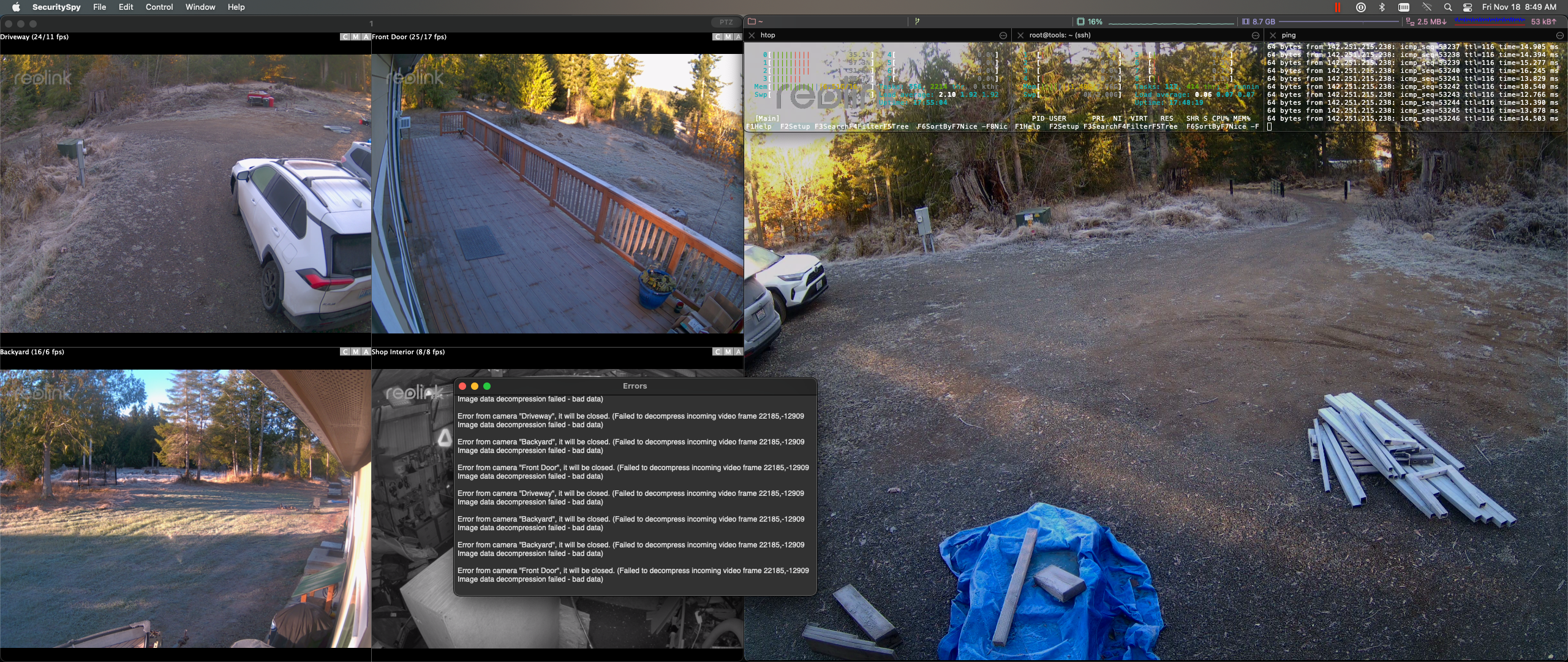
Hi FWIW I've been getting the decoder errors since the last security spy update (5.5.2) released earlier this month. I only updated the OS to ventura yesterday, so I don't think it's related.
-
I did the upgrade to Ventura yesterday as well for my older Mac Mini (Intel i53GHz 6 core also with 16Gb of RAM). No issues on my end so far. I am running 4 camera's but plan on expanding with possibly another 4 (hoping that does not break the system). My load appears to be about 6% per camera (they are running at 8.3MPixels, at 15fps, with H.265 for the format). Not sure if that helps.
-
Hi @sirwally this is most likely bad data being sent by your Reolink cameras. The main thing to do is obtain and install the latest firmware on your cameras from Reolink - their firmware has improved over time, and if you are running older firmware this could be the cause of these kinds of problems.
Nothing has changed in the 5.5.2 update specifically related to video decoding, so I'd be very surprised if this update was the cause. But, if you want to roll back to the previous 5.5.1 release to check this, you can do so via the menu option at SecuritySpy > Debug > Change Software Version.
-
I upgraded to SS 5.5.2 and the number of times I get the decode error has jumped up to a couple times an hour, no other changes to system or anything.
It only happens when I have the All Cameras window open, but I've always kept that open 24/7 without problem before. If I close the All Cameras window, though, I don't receive the error.
-
Correction/Update... After upgrading to 5.5.2, I'm now occasionally getting the decode error even when the All Cameras window ISN'T open. I've never once gotten this before when that window wasn't open.
-
I haven't had the decode error since I downgraded to 5.5.1
-
I've looked into it, and the only relevant change here between 5.5.1 and 5.5.2 is related to the reporting of these errors, rather than anything that could cause them in the first place. Version 5.5.1 tolerates more bad frames before reporting them than version 5.5.2 does, which explains why some users are seeing more of these errors, all other things being the same. We'll review to see if we should revert to the previous reporting behaviour, but fundamentally the problem is the bad frames coming from the camera, and the best way to reduce the likelihood of this is to make sure the camera is running the latest firmware, and make sure the network is working well (high-quality gigabit Ethernet switches, good cabling, using Ethernet rather than WiFi).
-
My decode errors have disappeared (mostly, just 1 or 2 a day now) without any action on my part other than I upgraded to 5.5.3b4, for an unrelated issue. (The preview thumbnail cropping concern.) Although I think that has now been superseded by a release version...? (Is 5.5.3b4 newer than 5.5.3, or the other way around, 5.5.3 is the final no-longer-beta version?)
I can't help but think there is more to it than the reporting threshold, though. On the macOS side likely, not the SS side.
The reason I can't shake that suspicion is that I had never seen that error, until the instant I upgraded to Ventura. And I didn't upgrade my version of SS at the same time, so I was running the same SS both pre-Ventura (no errors) and post (lots of errors).
I wonder if some of the built-in Apple codecs that are used acquired some inefficiency in the new version?
-
Version 5.5.3 is newer than 5.5.3b4, so I would recommend switching to the 5.5.3 release version. I hope this will also run smoothly.
It's difficult to pin down the cause of these problems. Yes, macOS updates can change the performance of video processing, but so can many other things, for example other processes running on the machine, or even the time of day or the lighting conditions causing the camera to produce more or less complex data streams.
-
Upgrade complete. If there are any changes from b4, I'll let you know, but I doubt it.
At least in my case, SS is running on a dedicated Mac mini 2018 server without anything else running on it (and has always been, this year) and also the weather/lighting/environment isn't anything unusual compared to the prior year or so of time my configuration has been unchanged. So that is why if I was a betting man, I'd be pointing at macOS... haha
If there is any way I can help out with troubleshooting, don't hesitate to ask.
-
Im also experiencing constant fan issues with Ventura. I have tried both 5.5.7 & 5.5.6 the issue is with both so my conclusion is that it's Ventura, as all was well before. I run three cams two Hikvison and one ((Reolink) which has been firmware updated). I also don't capture video just jpg images at 10 and 20 second intervals. I did use video capture and thought it was that but it does the same with jpgs as well.
When I quit SS the fans start to go quite. And when I re-open they gradually start to constantly run. Ventura defiantly doesn't like SS.
Systrm specs
Retina 5K, 27-inch, 2019
3.7 GHz 6-Core Intel Core i5
Radeon Pro 580X 8 GB
40 GB 2667 MHz DDR4
13.3.1 (22E261)
-
Hi @appleibook1 if you email us and include a debug file (SecuritySpy menu > Debug > Create Debug File On Desktop), we will take a look to see if there is anything unusual happening.
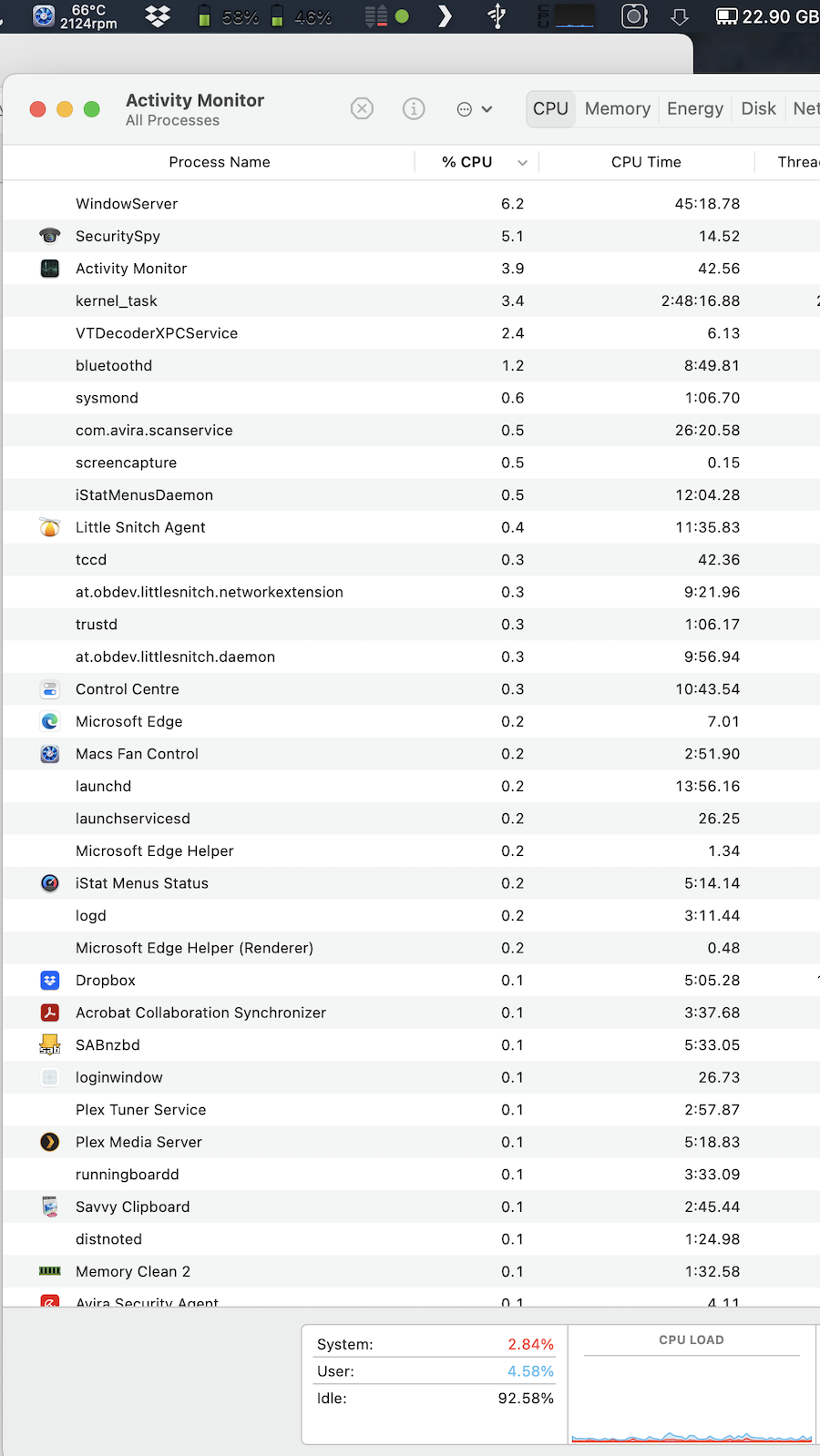
Depending on the system setup and how you use SecuritySpy, a certain amount of resource usage, which can increase the fan speed somewhat, is to be expected. This doesn't necessarily indicate a problem that needs to be solved. The main number to look at to see if your Mac is overloaded is the "Idle" percentage shown at the bottom-left corner of the Activity Monitor window - if this drops below 30% then the Mac is becoming overloaded. What is this number on your Mac while SecuritySpy is running?
-
I am not a big fan of Ventura. Why do they think they need to change the location of all of the preferences? They moved the feature "wake or startup everyday" from a simple to use button, to a line of code that must be typed into the terminal. Does this sound like progress? Also, there is a major fail in the os. it will no longer automatically connect to a file server or NAS at system startup. This has worked in every version of the OS all the way back to 7.1. Not anymore. fail.
-
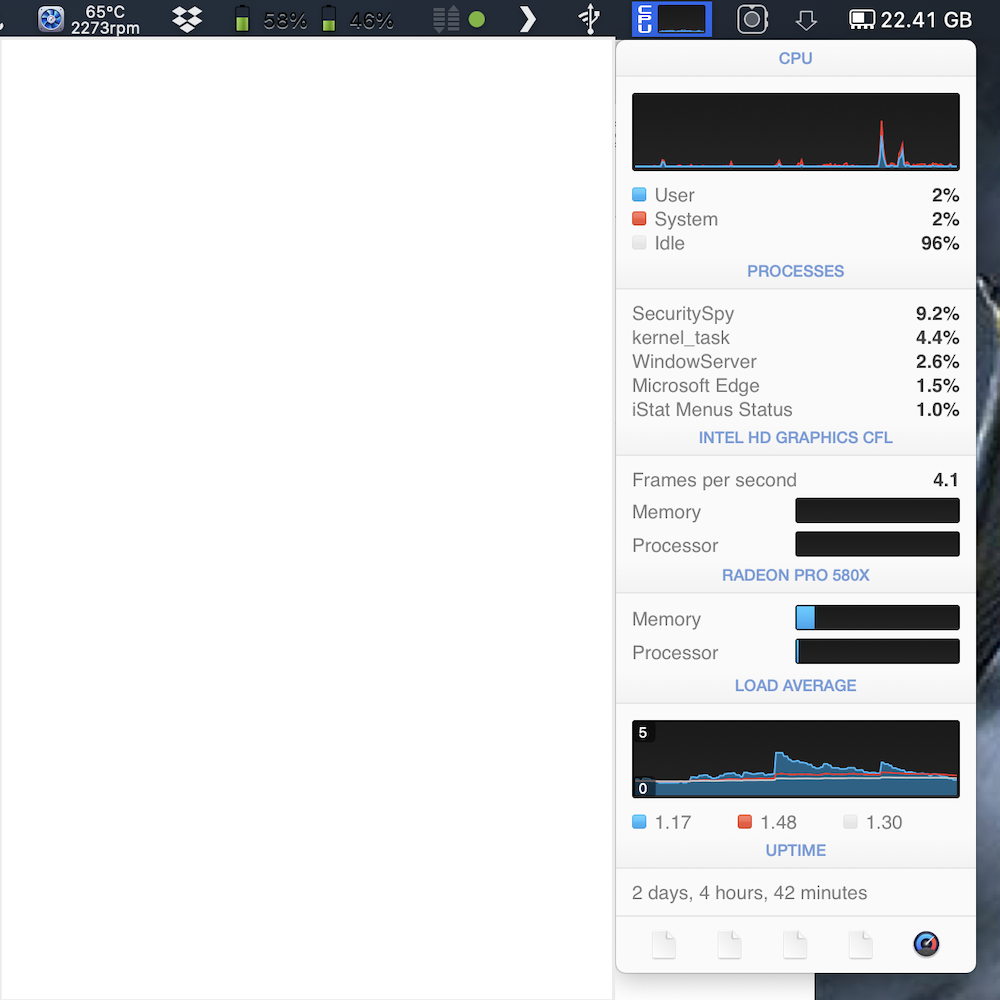
Hi Ben thanks for the reply. I have SS running and the idle is 95.58% as per screenshot. I have also noted that this "VTDecoderXPCService" I have as many as 8 of these processes running. I also noted that my usage again in the screenshot screenshot "system is 2.84% and user 4.58%. This should be a walk in the park for my spec and not have fans running at full blast for minor computing work. I have reinstalled Ventura and it has not made any difference.
-
Fans spinning are a good thing... Look at all the crap you're running - anti virus, plex, sab, edge, dropbox. Rendering frames from security cameras takes processing power, which creates heat, and your fan kicks up the rpms to keep the cpu cool. There's nothing wrong with fan noise. FWIW I've been running SS on ventura w/o issue for months now.
-
Hi @appleibook1 - SecuritySpy and the VTDecoderXPCService (which is used by SecuritySpy for video decoding) are barely using any resources. Yes, you have a bunch of other processes running that are using some resources, but this Mac is apparently running mostly idle - over 90% idle in fact. I would expect on this system that the fans should be barely noticeable - not spinning so fast as to be a nuisance, and certainly not working at full blast. If the fans are doing this, then I don't think it's due to the actual resource usage. Some possibilities are:
- Physical obstruction of the air vents or buildup of dust. Make sure the vents are unobstructed. Run a vacuum cleaner over the vents to try to remove dust.
- Custom fan-control software: if you have any third-party software that does any kind of fan control, try removing it.
- Try booting your Mac into Safe Mode. If you then don't see the fan problem, you know it's being cause by a software component that you have installed.
- User-installed parts: if you have opened up the iMac and installed an SSD, this can cause fan problems (if the Mac can't get temperature data from an internal disk, it will spin up the fans as a precautionary measure).
- Perhaps some kind of Ventura bug, albeit not one I've heard of. Have you opened a support ticket with Apple about this? Perhaps this would be useful.
-
Cheers guys. Ive tried all the usual tricks to try and eliminate my problem. I have had SS running on this machine since 2020 with no problems. All the crap you talk about has also been ok, just since upgrading to Ventura has this problem started. I removed apps one at a time and found that I had no fan problem with SS removed, added it back and the fan problem reappeared. As stated I only capture images at 10 and 30 sec intervals, I also used to capture video with no problems prior to Ventura. Hence the conclusion be it right or wrong that SS and Ventura don't like each other. I'm not a techy so can only do basic stuff, so as someone has suggested a trip to the Genius Bar is on the cards. Thanks again for your input and thoughts.
-
It's strange because your resource usage is so low, so something seems anomalous here. It's the system that decides how fast to run the fans, depending on the current thermal conditions, and SecuritySpy has no direct control over this. Since you believe this is a Ventura-specific issue, one useful thing to try could be a reinstall of Monterey to see if it has the same issue or not - here's the download link.




