Reolink RLC-823A working with latest firmware

Hi all,
I just wanted to drop a line and say that I just got a Reolink RLC-823A in. It's working great with SecuritySpy using the latest firmware (v3.1.0.956_22041511_v1.0.0.30). After upgrading it, I had to go turn ONVIF on in the camera settings. After that, everything works.
I know Reolink isn't a favorite here, but this camera is pretty full featured for its price, so it's hard to pass up.
Comments
-
Better off with any Amcrest IMHO
but good on you for getting it working!
-
I've been playing with this camera for a few days and have it set up remotely at a construction site that I'm monitoring.
It continues to perform pretty well with SecuritySpy. The only issue that I seem to have is that I am unable to hear audio (the camera is a two-way system with both a speaker and a microphone). The speaker icon doesn't appear at the top right window of the video for the camera. Ben, is this something that would be possible to support?
-
Camera-to-computer audio should certainly work, but not computer-to-camera audio (this is currently supported for Axis, Dahua, Hikvision and Amcrest cameras only).
Do you have audio set to "This network device" in SecuritySpy under Preferences > Cameras > Audio?
Are there any audio settings available on the camera? Is this turned on? What audio encoding settings are available (e.g. G.711, PCM, AAC etc.)?
-
Hi Ben,
The Audio device pop-up is set to "This network device" for this camera.
I looked in the camera settings and sure enough, the audio recording was turned off. Flipping that switch did it, and now I can hear audio :)
Thanks for the suggestion!
-
Great to hear that, I'm sure this information will be useful for other users too.
-
Thanks Ben. I also sent you a PM regarding this. Please check.
-
Just a 'me too' post:
I bought a RLC-822A in the fall of 2021and it was terrible at first. Once I got a newer firmware, it worked great with SecuritySpy. The camera view is a second or two behind the others, but I think that's just due to the higher bandwidth or maybe the H265 processing time.
That said, I might try out a Hikvision next instead of getting another Reolink. The ColorVu feature looks impressive.
-
Thanks for posting information about this camera. Have you used the patrol function? Are you able to kill the spotlight feature ?... I would prefer to get a camera that has a dark cover over the dome so it's less conspicuous… I plan to use this in my alley, turning back-and-forth continuously basically along 180° angle of the alley. Did you have any trouble discovering this camera? It looks like you can control it through an app on an iPhone, programming the petrol points, can you also go to the IP address in safari and configure the camera? Thanks very much. Jay
-
@jay - in terms of auto-patrol, the best way to set this up is in SecuritySpy: define a few presets, include these in the patrol sequence via the settings panel in the PTZ drawer, and then press the play button in the PTZ drawer to start the patrol.
-
Ben-thanks, I am aware of the patrol function within the app, but it is a bit rudimentary. Delay is the same for all stations, and speed between stations is always the same. The patrol functions of cameras are more sophisticated. Thanks. I would really like to see an AI for animals. Jay.
-
The problem with using the camera's auto-patrol is that any camera movement that is not initiated by SecuritySpy can trigger SecuritySpy's motion detection. So using the camera's own auto-patrol would only be viable if you are using Continuous Capture rather than Motion Capture in SecuritySpy, with no Actions.
You will be pleased to hear that the latest version of SecuritySpy now has an AI that detects animals! If you don't have it installed yet, you can obtain it from the SecuritySpy download page.
-
Thanks Ben, I really appreciate all your ongoing efforts and the priority you place on listening to your clients concerns.
With regards to PTZ, for me, it comes down to speed.
For my application, I want a nice slow pan of a street, I cannot set the PTZ speed slow enough with in SS, to get this desired effect. With my camera, the only way I can achieve that is by setting the camera software to the slowest speed for PTZ… On a scale of one to five – one. Then the SS patrol function, with regards to pan speed, is OK… I'd like it to be slower… But it's OK. However, if I then want to jump to a preset, its cripplingly slow… Unusable. From my camera, there is sort of a workaround, it actually will let you adjust for a different speed when you change the preset with the keyboard stroke, but that is within the browser interface of the camera… But that's not really practical most of the time for me.
I think it would be good goal, of instead of having a global setting for both speed and patrol delay, to parse those out for each preset… Which is pretty much with the firmware does. Again, decreasing the speed by several factors, and unless there's a reason the delay can only be five minutes, I'd like to see that doubled... But seconds should remain the increment.
Thanks very much for the animal AI, I'm not sure my cats like that I am stalking them now. I believe I saw that at some point in time we will be able to sort captured footage by AI on the app?
I have a 50' CAT 6 line running to a POE switch, cameras are 4K, 12 FPS… how many cameras can I hook up to the switch with this single CAT 6 line going back to the main switch? If I can get the PTZ patrol to work, I want to add an additional camera, so I need to step up my license to 9+ TIA!
As home automation moves to IP-based devices, I hope that'll allow for some integration to Apple HomeKit down the road for our cameras.
Thanks Ben, be well!
-
I understand what you are describing and why you might want this, but it's very unusual to want different speeds for different PTZ functions, which is why this functionality isn't built into SecuritySpy and why we are unlikely to add it - this would clutter the UI significantly and would not be useful for the vast majority of users.
One thing we might be able to do is to enhance the AppleScript command that SecuritySpy offers for controlling PTZ, to add a speed parameter. This way, you might be able to write your own AppleScripts to achieve what you want. If you are not familiar with this, see the SecuritySpy AppleScript Examples page - there is a PTZ example on this page. What do you think?
The other issue you should be aware of is that all the time the camera is moving (e.g. slowly panning across the street), it is effectively blind to motion, so you may want to use Continuous Capture recording rather than Motion Capture recording.
Yes, we are planning to add the ability to search captured footage by AI object in a near-future update to our iOS app.
In terms of the bandwidth question: assuming a gigabit switch and H.265 video at normal quality, you are going to run out of ports on your switch before you run out of bandwidth. Your real-world maximum throughput is going to be 100 MB/s or somewhere around there; check the bandwidth of your cameras, as reported in SecuritySpy's Camera Info, and then divide 100 by the average bandwidth in MB/s to get the maximum number of cameras. 0.5 MB/s would be expected for a good-quality H.265 video stream with those parameters, which gives you up to 200 cameras over this link. H.264 would be roughly double this bandwidth, so half the number of cameras.
-
Just following up on this thread. It's been almost 6 months since I purchased the RLC-823A and it's performed solidly under SecuritySpy. I even purchased two more and have them installed. I don't know what kicked Reolink into gear, but something is definitely different about the company, and their products are really meeting the cost-value sweet spot, plus they are working beautifully with SecuritySpy.
-
Thanks for the followup boisy. I've been a little irritated with my 822a, the delay is odd. Watching a car go by on one camera, then 2-3 seconds later on the Reolink is distracting. I just switched from h265 to h264 though, I'm hoping that improves things. Other than that issue, Reolink does seem to have a lot of value in their price range. I'll probably get more if I can figure out the delay issue.
-
I've been switching out some of my cameras to Reolink and have been very impressed. Especially with the new TrackMix and DUO 2. With these two on the front of my house I get a 2560X1440 180 degree wide view from the DUO 2, a 104 degree 4k view from the main TrackMix camera, and an up to 6x zoom from the 1080p TrackMix camera, and the TrackMix autotracks people/cars/animals automatically depending on how you set it up. Basically can't miss anything now in front of my house. Definitely worth checking these cameras out.
I did have issues with the Reolinks dropping out from SecuritySpy fairly frequently for a few seconds before the feed starting again. I just installed 5.5.3b2 and it seems to be working a bit better, but I did just increase the key frame frequency for my Reolink cameras, so I'm wondering if that was what improved it.
So my question is if something was changed to improve compatibility with Reolinks in a recent update.
-
Hi @emergent there is nothing specifically related to improvements in connection reliability to Reolink or other IP cameras in the latest 5.5.2 update, so if you are seeing an improvement it's probably due to another factor, or a coincidence. Usually if you are seeing dropouts or disconnections it's going to be a network issue.
-
This camera is 25% off, as a deal of the day, on Amazon. $186. Just a few hours left on this deal, on Monday, November 14. I pulled the trigger, I don't know of any other camera companies that are as committed to the Mac platform like this one. Supporting both iOS and OS. https://smile.amazon.com/gp/product/B095H2BBWZ/ref=ppx_yo_dt_b_asin_title_o02_s00?ie=UTF8&psc=1
-
Hey gus,
Where is that switch you mentioned between H.264 and H.265? I'm on Firmware Version v3.1.0.989_22051911_v1.0.0.30 and do not see an option.
Thanks!
-
Boisy or anyone who can help. I installed a Reolink 823A. I cannot get it into SS; I can't find a profile that will pull it in. I was very frustrated that I had to use the Reolink app to even get a picture out of the camera & now it won't come thru SS. Of course I am also fairly certain there is some operator errors here (that would be me) Please send any suggestions.
-
Hi @RG7 connect to the camera using a web browser and enable the ONVIF and RTSP options, as shown in these screenshots:
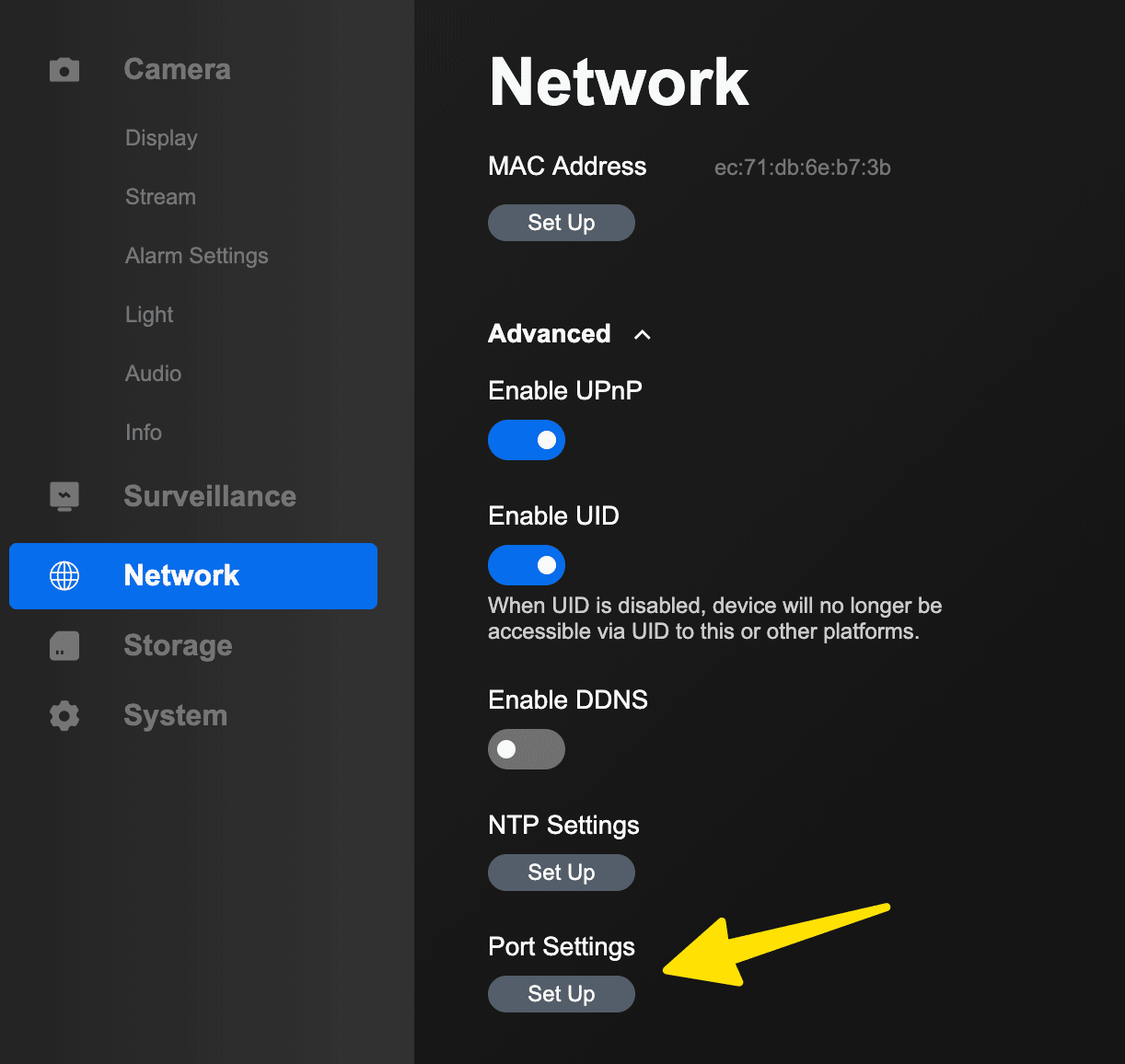
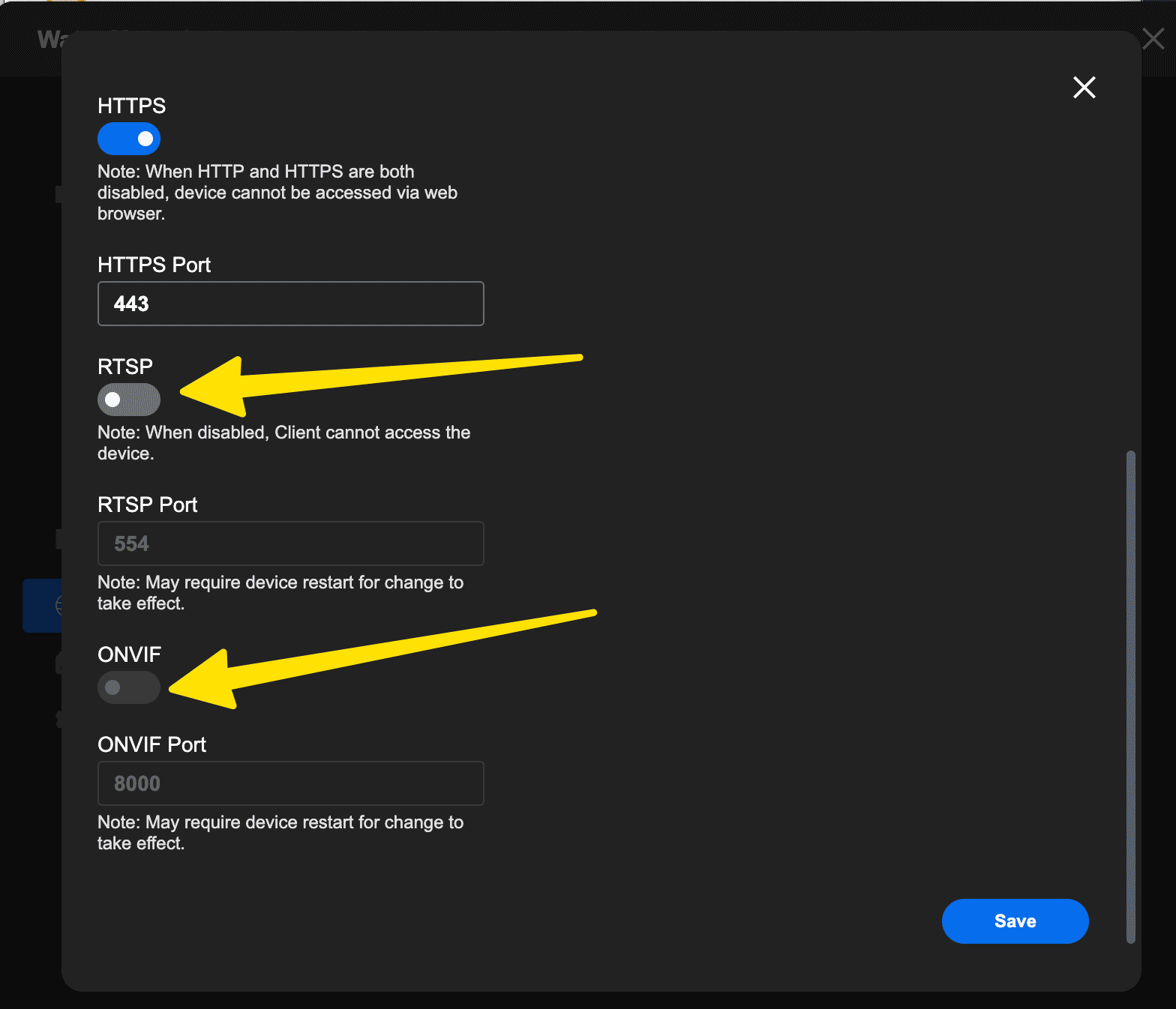
If you don't know the address of the camera, use our Network Device Finder app to locate it on your network
Once you have enabled these options, the camera should be auto-discovered in SecuritySpy, and should work using either the ONVIF or the Reolink profiles.
-
I too have the RLC 823A. I'm able to bring up the image using the Reolink App (I've enabled ONVIF and RTSP). However, when I use the ONVIF profile, for some reason simply won't show up in SS. I HAVE been able to get a great image from SS using the Reolink profile. The problem with the REOLINK profile is that the PTZ doesn't work. Any thoughts on this? Also, the firmware (according to the ReoLink app) is updated.
-
OK. Upon further experimentation, it looks like rebooting the camera allowed me access to the ONVIF profile. All is working well now!


