i-Frame interval and motion triggers

Hi Ben,
A few questions on my camera set up, I'm having trouble getting motion triggers working on any of my cameras.
- First, I am running all of my cameras at 10 fps, with an I-frame interval at 10 as well, and I believe this means there will be a key frame every second. If I have my motion detection set to 0.5 seconds of motion, do I need to set my I-frame interval to 5? My understanding is that the motion detection only looks like the first frame of a group (key frame).
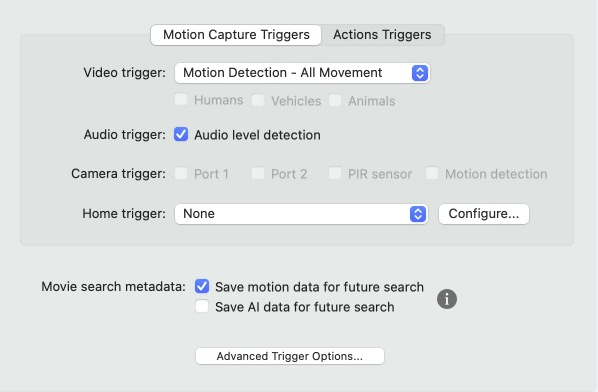
- I've attached my trigger and motion record settings, do you see anything wrong here?
Comments
-
SecuritySpy's motion detection doesn't only look at key frames - it always looks at decoded frames at a rate of 6 fps (which is the optimal tradeoff between accuracy vs. resource usage). So purely from the point of view of motion detection accuracy, it doesn't matter what the camera's I-frame interval is set to.
However it is certainly worth setting the camera's I-frame rate to a reasonable value in order to help SecuritySpy generally deal with the video stream for various other aspects of the software. Some cameras accept this value as a certain count of frames (in which case for a 10fps stream, the I-frame interval should be set in the range 20-30), while other cameras accept this value as a number of seconds (in which case, 2-3s is a good range).
I don't see anything wrong with your trigger settings, however your screenshots reveal that you are using an old, now-discontinued, version of SecuritySpy. We can only support the latest v6 version of SecuritySpy, so if you need further help debugging this issue, please look at upgrading to version 6.
The other thing to check is that the Motion Capture recording mode of your cameras is set to a suitable schedule, for example "Armed 24/7" if you want this to be active at all times. Please see the user manual section Recording and Schedules for more information.
-
I'll look at ver 6, and chances are I will upgrade, I don't see myself not using SS at any point in the future. I think I've been using it for 12 years at this point. I use Milestone at work and I've used Blue Iris before (nightmare IMO) and SS is the best out there, especially for an Apple ecosystem guy like me.
I think you nailed it with the time schedule, that was my problem. Thanks for the support.
Josh
-
Hi Josh, it's always great to hear from such a long-time user, and thank you for your kind words about our software! Hopefully this is just a scheduling problem, which will be easy to resolve.