Since updating to 6.20 I keep finding messages that my disk is too slow

I can't find any evidence of problems with the disk. It's a 2 TB SSD connected via external USB3 that runs between 1/2 and 3/4 full.
The messages suggest that recording has stopped but as near as I can tell it picked right up again.
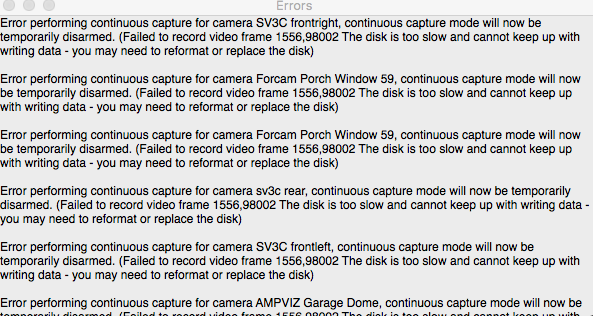
Is this a new problem I need to be worried about, or just something different in 6.2? I really don't need to know if recording paused momentarily for a few seconds while I was asleep (although there's actually no useful indication of when it happened.)
Comments
-
This is not a known/new problem - in fact 6.20 should be significantly more efficient in terms of disk access than 6.19, so this problem should be less likely, not more. This could indicate a problem with your recording disk, but it's not possible to confidently diagnose without further information.
After this happens, SecuritySpy will back off for a short time and then try recording again, so this recovery mechanism sounds like it's working, but still this is a problem that needs to be fixed in order to avoid interruptions in recordings.
My advice would be:
- Revert to the previous 6.19 version to check whether this is in fact a new problem in 6.20. You can do this at Settings > License > Choose Version > 6.19 > Install. If you see the same problem with 6.19, this points to the disk as the culprit.
- After running the above test, email us and include a debug file (SecuritySpy menu > Debug > Create Debug File On Desktop), and we will investigate. Further troubleshooting of this issue should be done via direct correspondence rather than via this forum.
-
Thanks, Ben. Back to 6.19.
-
No messages in SS 6.19.
-
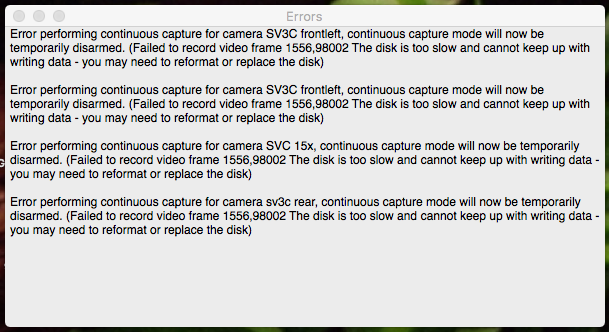
Ran 6.21 update. Got message. Going back to 6.19 again.
-
To get to the bottom of this we will need to investigate and this is best done directly with you by email rather than this forum. Please email us and include two debug files (SecuritySpy menu > Debug > Create Debug File On Desktop); one created by 6.19 and the other created by 6.21 when this problem is showing. Include "escalate to human" at the top of your email so that it bypasses our helpdesk bot and goes straight to our human team.
-
We are also experiencing similar messages since upgrading. I am unable to Revert to the previous 6.19 version, the error 516 File already exist. Is there somewhere I can download the older version ?
Happy provide the debug files.
-
You can download SecuritySpy 6.19 here. Before you revert, please generate a debug file. Then, run 6.19 for a day or so, to test whether you see the errors with 6.19 (this tests whether there is actually a different between versions, or if the timing of the errors started was merely coincidental with the update, which is something that happens often). Then please email us with this information and the debug file so that we can investigate.
-
Thanks, I'll be back in touch in a couple of days.
-
Would be great if this error message could contain some useful info, like what time it occurred.
Thought I'd already confirmed that it happens in 6.20 and 6.21 but reverting to 6.19 is a fix-- really surprised at the suggestion that the timing might just be coincidental.
-
Hi @nealk if you go to File > Open Log you can see the full log, which includes timings of the errors.
In terms of the timing/coincidence thing - this is a very common occurrence after updates. A user has a problem, blames the update (understandably), but it turns out to be something else.
In your case the signal seems much stronger than this that you are having a problem with these specific versions, but you are the only one out of many thousands of users (except maybe @swift_bk now), and on the other hand I know that version 6.20 has actually fixed this issue for other users. This is why I have been asking for debug files from you, in the hopes that I can find out exactly what is happening with your specific system that may be interacting with our software changes in 6.20/6.21 to cause this problem for you (BTW when you email, include the line "escalate to human" at the top so it bypasses our firstline support bot. Please include one debug file from 6.19 and another from 6.21).
-
Hi @swift_bk many thanks for sending the debug files, this was very helpful. I've replied to your email so please see that for more information. The summary is that you have an underlying disk issue - your disk is stalling for extended periods of time. Versions 6.20/6.21 are more sensitive to this, reporting it sooner than 6.19 would have, hence the difference that you have observed. I have included in my email troubleshooting steps.
@nealk this could explain what you are seeing too - if you also send your debug files, I can determine for you whether this is the case or not.
-
My discs are fine. Can this be tweaked somehow so no alert to clear? Or am I just stuck at 6.19 now? I already have enough pop-up boxes to clear every day.
-
Hi @nealk we've now made some changes in the latest beta version of SecuritySpy (currently 6.22b1) that should help you here. SecuritySpy will now tolerate up to 40s of disk stall (significantly more than 6.20/6/21), and in addition will give you a warning to the log (without stopping recordings or displaying a popup) if it detects a stall of over 20s.
However, I would push back on your statement that your disks are fine. Versions 6.20/6.21, although more sensitive to this problem, also had quite a generous disk buffer, and the fact you are seeing these errors means that your disk is frequently stalling for extended periods of time. So while a longer disk buffer will hopefully reduce the instances of these errors for you, a stalling disk will affect many other areas of the software, such as searching for and playing back recordings in the Browser, web interface and mobile apps. If this is something that you are experiencing, then a disk reformat or replacement (of the drive that SecuritySpy is using for its recordings) could be something to consider.
Please report back once you've had a chance to test the beta.
-
My disks are fine. Was pretty obvious that something changed between 6.19 and 6.20 to cause the alerts.
I'm willing to bet Security Spy is causing the lockups when 6 cameras save and start videos on the hour.
-
I hope the beta avoids the errors for you, but I would recommend keeping an eye on the log for warnings about the recording disks.
-
Installed 6.22b1, seemed OK for a day but just got the error. Looks like it happened while reviewing or uploading a video from another external SSD. It pops up under all active windows so I can go hours without noticing it, so hard to recall exactly what's happening during the timeout. This is a 2014 Mini, already pushing it to the edge recording 6 cameras, not too surprising if the USB bus is getting saturated. I have no concerns about the disk, checks out fine in DU and otherwise no hiccups.
-
You're right to also consider USB speeds. Your Mac mini's USB ports are USB 3, which work up to 5 Gbps. This is plenty, IF your connection to the drive is actually achieving these speeds. Here's how you can find out:
Hold the alt/option key on the keyboard and click the Apple menu; select "System Information" (or, on older macOS versions, you may need to go to "About This Mac" to see the option to get the system information).
On the left, select the USB section, and on the right select the disk that you are using for recording in SecuritySpy. In the section below, you should see the "link speed" - what does this say? If it's anything less than 5 Gbps then this could be causing your problems. A slower speed here would be caused either by the cable or the housing that contains the drive.
-
Thanks. "Up to 5 Gbps." Just pushing this system to the edge with continuous capture X 6 plus using the mac for other things concurrently. No real problems at the moment.
-
I had a similar problem with SS flagging disk errors. Said the disk was not fast enough. There were no problems with the disk. The problem was the cable I was using to connect the disk to the Mac mini was not fast enough. I learned a great lesson there. A faster cable fixed the issue. Just wish I had learned that sooner.
-
Well, I do have an open thunderbolt port. I wonder if it would be worth it to track down a Thunderbolt enclosure for the scratch drive.
-
Hi @nealk - 5 Gbps is a good speed, indicating your cable and enclosure are good. Video streams from IP cameras typically run at under 1 Mbps, so even with 6 of these recording continuously to the disk, that's only a fraction of a percent of the available USB bandwidth. Therefore, USB limits are unlikely to be the problem, and switching to Thunderbolt probably won't help [caveats: I'm assuming there aren't any other bandwidth-hungry devices sharing that specific USB bus, and I'm assuming your cameras aren't using a particularly high-bandwidth codec like JPEG, or you're getting SecuritySpy to re-encode to something like JPEG or ProRes].
-
I've seen a very similar uptick in the same message. I used to get it all the time and ended up upgrading my external enclosure and cable. This helped but 12 cameras recording on a single drive will still trigger this on high activity times so I assumed I was pushing the limits of the drive.
I'm glad to hear that I'm not the only one that sees this message regularly though.
If only we could add another internal disk into these macs easily.
-
Hi @jensenchappell please also try the latest beta version of SecuritySpy, which allows for longer disk stalls before giving up. I hope this improves the situation for you. It's also worth checking camera data rates (which you can do via the Camera Info window). If you see rates of over 1 MB/s, it should be possible to adjust camera encoding settings to bring this down significantly without impacting visual quality too much. I would recommend these encoding settings:
- Codec: H.265
- Frame rate: 10fps
- I-frame interval ("key frame rate" / "GOV length"): 30fps or 3s
- Type: VBR
- Quality: medium
-
Getting the pop-up about every other day-- just caught it for the first time while aware of what I was doing at the computer.... nothing in particular, but it's 5 PM so I think it is because of all of the concurrent saves and new video starts.
-
Awesome! I'll give this a shot! Thanks!
What I ended up doing between 8/29 and today is flipping over to a thunderbolt powered drive which has helped significantly. I still see the message but not nearly as often. It still appears on occasion which I wonder if it's just because of the large amount of writes for one drive. Like you said, I should adjust the rendering settings and make it more performant writes.
Thanks for the suggestion!