Security Spy Web API video stream question

Ben, amongst the various options for requesting video from SecSpy:
https://bensoftware.com/securityspy/web-server-spec.html
HTTP multipart "server push" video stream
• jpeg (default; the only codec that works in HTML img tags)
• h264
• h265
• h26x (the server chooses between H.264 and H.265)
RTSP video/audio stream
An RTSP video/audio stream, which can be received by any RTSP player, such as VLC.
HTTP Live Streaming video/audio stream
An H.264 HTTP Live Streaming video/audio stream, which can be used in Safari within an HTML <video> tag.
Which of these, if any, is equivalent to an unprocessed (ie, Security Spy is not re-encoding) relay from the cameras?
Comments
-
Web streams usually have to be re-encoded, since they aren't necessarily the same resolution, frame rate or codec as the source video.
But you can obtain a passthrough stream without re-encoding like this:
- Under Settings > Web > Advanced, enable the option "Pass through H.264/H.265 data".
- Use RTSP streaming since this is widely compatible with players.
- When constructing the URL, use "vcodec=h26x", and omit the width, height and fps parameters.
-
Very cool. One addl question. You said use RTSP, but is that required to get the pass-through stream? (I'm building my own player)
-
@Ben Clarification on that followup question, in case it wasn't clear - what I meant was, is acquiring a pass-through stream only possible via RTSP protocol? Does the "vcodec=h26x with no other parameters" trick work with any other protocol SecSpy provides?
-
HTTP Live Streaming always recompresses. This is because it needs a very regular cadence of I-frames in order to manage its internal fixed chunk durations, so the source video data can't be used for it.
H.264/H.265 over HTTP multipart does respect this passthrough setting, however this is a non-standard streaming format. But, if you prefer it over RTSP, I'd be happy to supply the (relatively simple) details.
This leaves RTSP as the standard stream for which this setting applies, which is why it was the one I recommended. Will this work for you?
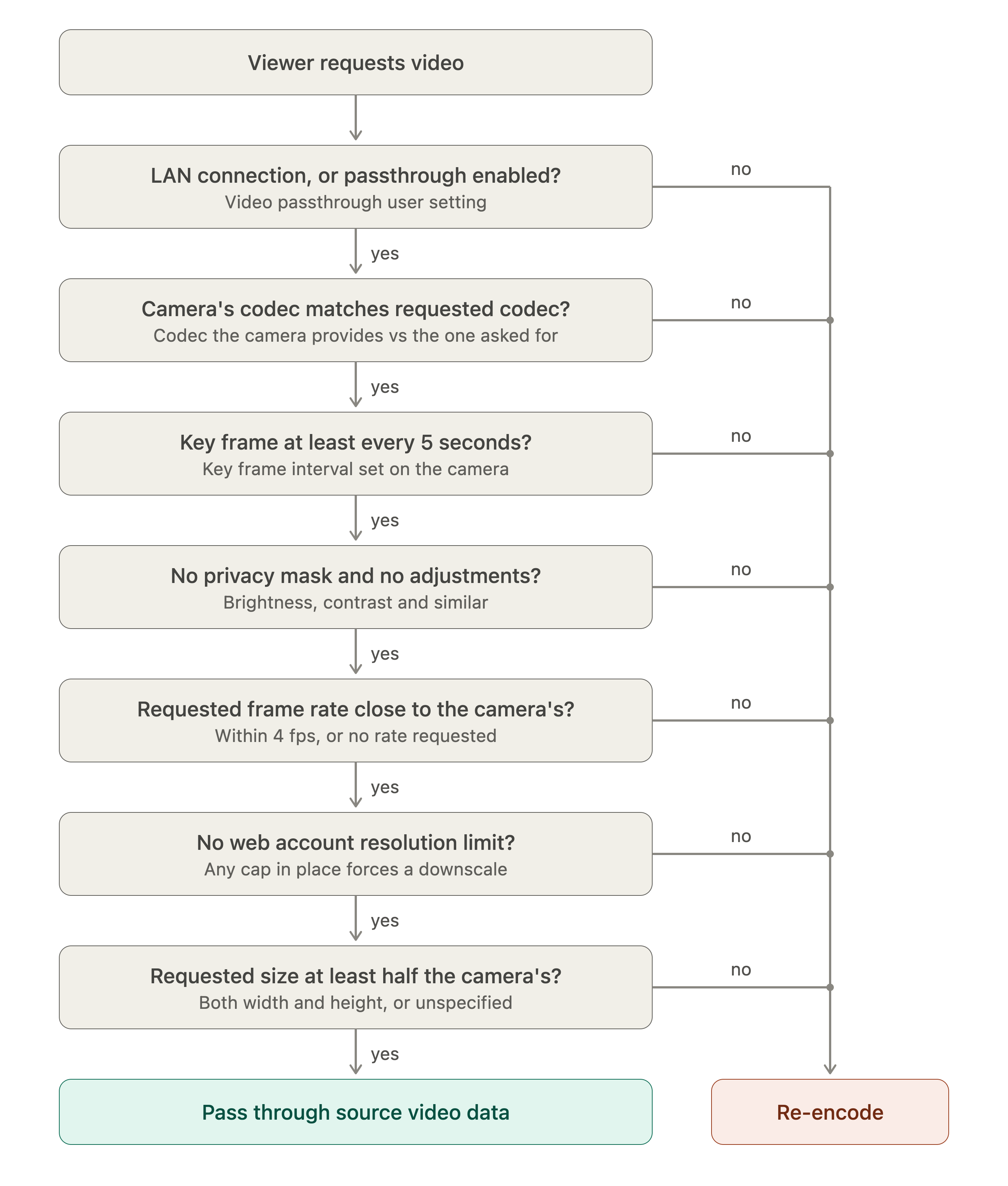
One other thing I forgot to mention: for passthrough to work, the web account that you are using must not have any account-specific resolution or frame rate limitations. These settings are found when editing web server accounts under Settings > Web.
-
>H.264/H.265 over HTTP multipart does respect this passthrough setting, however this is a non-standard streaming format. But, if you prefer it over RTSP, I'd be happy to supply the (relatively simple) details.
Yes, please. I'd to explore all available options.
-
No problem, we have put together a document that comprehensively describes this stream: SecuritySpy Video Stream Specification. Please let me know if you have any questions about it.
-
Wow, I wasn't expecting something that thorough. Given all that info, I may go with the multipart solution. Thank you!
-
Pretty cool @Ben . I got the http multipart basics working!
I was really sweating having to figure out my own RTSP implementation. 😅
I had found this pure Swift port of Retina (Rust RTSP library):
https://github.com/steelbrain/IPCamKit
...but it kind of looks like a one-off, very few stars/issues/comments, not sure if it's actively maintained...so I was dreading the idea of trying to package it in as a dependency and then plodding through figuring out if it works, possibly having to fork it etc...
This multipart solution really helps. Thank you!
-
Great to hear that! Yes it's much easier to parse than RTSP/RTP. Good luck with the project, let me know if you need anything else.
-
@Ben Am I correct in saying that there is no absolute time (wall clock time) associated with each video frame in the multipart stream?
-
Hi @photonclock that's correct - the timestamp is value with a base of 1/600s, relative to the start of the stream, not absolute. Is this good enough for your purposes?
-
I think so. Just wanted to sanity check I wasn't missing it. I'm used to broadcast video, where every frame is stamped with an absolute time. I suspect the rationale for this approach is that this is security cameras, with differing frame rates and variable frame rates and unreliable frames rates, so everything's relative.
-
We haven't had need for absolute frame times for SecuritySpy's purposes, and it's never come up before as a request from users. However, if this is important to you I'm sure we could add it - it would be an easy addition with a new custom HTTP header.
-
It begs the question - what would the timestamp represent exactly?
It presumably would not be a camera timestamp, ie, "Time camera encoded this frame" (I assume many cameras don't timestamp frames and/or many do it differently so it's a whole other can of worms to support timestamps at the camera API level, on top of which then every stream of un-synced cameras have a different timestamp depending on their clocks...)
So...following on that thought, it would presumably be a SecSpy timestamp, but then what exactly would it be? ie, "Time SecSpy received first byte of this frame", "Time SecSpy received the entire frame and validated that it could decode it", "Time SecSpy received http multipart request to relay this frame", etc? (just making stuff up to convey the point...not sure where in the SecSpy pipeline this diagnostic would fit)
I don't know the answer, so I don't want to ask for something that is poorly defined.
Are you familiar with broadcast video, where you have a video reference clock, and then you have a timecode word (which is long & slow, all the bits of a SMPTE timecode word), and so it's defined as: the start of the timecode word (and the time it represents) shall be aligned with the rising peak of this video reference clock signal. So SMPTE TC 01:00:00:00 means this frame (if properly referenced to video clock) began to be captured at exactly 1AM.
What would a SecSpy absolute timestamp represent?
-
You're right that precise timing is tricky for IP cameras. Streaming is done via RTSP/RTP, which doesn't carry absolute frame timestamps. Instead, each frame carries a timestamp relative to a random start value that is supplied by the camera at the start of the stream.
SecuritySpy does measure the absolute times at which when frames are received. However, this isn't great on its own because it has a lot of jitter. So SecuritySpy combines this measure with the camera's supplied relative timestamps in order to derive final absolute timestamps that are both reasonable accurate and nice and even. It's this value that we could easily add to the HTTP stream, if you think it's potentially useful.
-
Could the HTTP stream include both (the absolute time received, and the secspy smoothed)? I'm curious how much of a difference there is. The thing is, I'm one step downstream of SecSpy. Camera --> SecSpy ABS Time Received --> Smoothed Time Received --> HTTP Multipart Request --> MyTimeReceived (prob more jitter here) --> MyTimeDecodingTheFrame --> etc ... so...when my goal is "what time was this frame actually produced" (acknowledging that only the camera knows that, so it's not truly knowable)...it might be good to have the closest measurement to "actual" possible...?
-
I've added a new custom header called "SS-UnixTime" in the latest beta. This is a standard UNIX epoch time value (number of seconds since 1 Jan 1970) but with millisecond precision.
This carries the already-smoothed value. How much this deviates from the raw source value will depend mainly on the processing load on the Mac - under heavy load, bytes/frames may be held briefly in various queues, leading to uneven frame processing and therefore higher timing jitter. Whereas on a fast Mac under light load, frames are processed immediately as they become available, so jitter will be minimal. But in all cases, the smoothed value is the best one to use for all purposes, therefore it's the only value that we supply in this new header.
Hope this helps!
-
Thank you! I will give it a try!
-
Ben, I'm seeing some things I don't understand with the SecSpy RTSP stream.
Using a VLC network stream connection as the example:
If I connect to the camera directly, the RTSP stream in VLC media info is reported as h265, 12 fps. This is correct.
The same camera RTSP stream via SecSpy reports h264 and 29.970030 fps.
I'm also having trouble getting VideoToolBox hardware decoding of the SecSpy RTSP to work.
Is SecSpy "re-encoding" an RTSP stream, or passing the camera RTSP through directly?
And if you're reading the earlier posts in this thread for context, never mind those for now... 🤓 I have SecSpy http multipart working well. I decided to go for the RTSP challenge as well after studying the IPCamKit Rust/RTSP project for a few weeks.
-
Yes, SecuritySpy is re-encoding this stream. It won't be increasing the frame rate (likely a reporting anomaly in VLC), but the difference in codec tells us that the stream is different.
Over a local network, you can get video passthrough without re-encoding by:
- Asking for codec=h26x
- Omitting width, height, or fps parameters from your request
If the stream is non-local (i.e. over the Internet), then in addition to the above you will need to enable the "Pass through H.264/H.265 data" option under Settings > Web > Advanced.
-
🤔
I'm confused.
This thread started with you recommending RTSP initially as the pass-through solution...?
I then diverted to the multipart video approach because you had all that great documentation, and it was generally easier. And that approach is working quite well.
But now you're saying SecSpy's RTSP stream is in fact always re-encoded?
>It won't be increasing the frame rate (likely a reporting anomaly in VLC)
Yes, I understand that. I think the RTSP stream coming out of SecSpy is simply not reporting a frame rate at all, so VLC is just defaulting to displaying 29.97. I am successfully decoding SecSpy's RTSP h264 codec now, but the goal in both cases (http multipart and RTSP) was to obtain a pass-through stream if possible to avoid an additional encoding burden being placed on the SecSpy server.
It would be great if you could add to the list tidying up the RTSP implementation so it provides stream frame rate, and avoids re-encoding when the "pass through" option is enabled. 🤓😊
-
The passthrough behaviour is the same for both HTTP multipart and RTSP streaming - my initial recommendation of RTSP was because this is more of a standard stream that can be decoded directly by many players (like VLC) - at that point I wasn't aware that you were planning to implement your own custom decoder.
My descriptions above about the passthrough decision process were simplified - the full decision flow is as follows:
Hope this helps!
