SecuritySpy vs. UniFi Protect

I am upgrading my home network to a UniFi system. I love SecuritySpy and have no intention of switching to UniFi Protect for video surveillance. But I'm curious if Ben or anyone else can offer a comparison.
I know that UniFi Protect is built to work with UniFi cameras, so it's not based on open camera standards like SecuritySpy. However many people seem to love Protect's features, especially its AI skills, and its tight integration with a UniFi network. I'm curious how the user experience compares.
Comments
-
Since I'm obviously biased on this, I asked Claude to put together an objective assessment to answer your question. Here's what it came up with! I think it did a pretty good job at providing the overview.
Both are excellent at the core job of recording and reviewing video. The real differences come down to philosophy: SecuritySpy is open and hardware-agnostic, whereas UniFi Protect is a tightly integrated, single-vendor ecosystem. Neither charges an ongoing subscription for core functionality, which sets them both apart from most cloud-based competitors.
Where UniFi Protect is stronger:
The headline advantage is integration. Cameras, recorder and network all live in one ecosystem and one app, so setup is close to plug-and-play, and PoE, provisioning and updates are handled centrally. If you are already going all-in on UniFi networking, this is a real convenience.
Its AI feature set is also broader than SecuritySpy's today. Alongside person, vehicle, animal and package detection, it offers facial recognition, licence plate recognition, audio classification, and a cross-camera "Find Anything" search that can re-identify a person across all your cameras and filter by attributes like clothing or a backpack. Processing runs locally on the cameras or on an AI Key/AI Port accessory, so nothing is sent to the cloud. There are also nice touches like PTZ auto-tracking, Alarm Manager automations (trigger floodlights, unlock a UniFi Access door), and native iOS, Android and web apps.
Where UniFi Protect is weaker:
It is a closed system. In practice it expects UniFi's own cameras. Third-party and ONVIF cameras are supported only awkwardly, requiring an AI Port per camera or an AI Key, with settings configured on the camera's own web interface and little to no official support. The lock-in runs both ways: UniFi cameras generally only work with Protect. Some of the more advanced AI features also depend on specific newer cameras or an additional AI accessory or licence. So you are committing to their hardware roadmap and pricing.
Where SecuritySpy is stronger:
It works with virtually any IP or ONVIF camera, so you can mix and match brands, reuse existing cameras, and never get locked to one vendor. It runs on a Mac you may already own, gives fine-grained control over recording, scheduling and per-camera behaviour, and integrates with macOS, iOS, tvOS, AppleScript, Apple Home and Home Assistant. Its in-house AI detects humans, vehicles and animals with high accuracy and supports AI-based search, and on Apple Silicon this is extremely fast and efficient. It is a one-time purchase with continuous updates rather than paid major versions, and support comes directly from the developer.
Where SecuritySpy is weaker:
It is macOS only and needs a Mac left running as the recorder, rather than a sealed appliance. Its AI, while very accurate at what it does, currently covers a narrower range than Protect. And you assemble your own system from separate parts rather than buying a turnkey bundle, which is more flexible but asks a little more of you up front.
In short: choose UniFi Protect if you want a sealed, single-vendor system with the broadest AI features and you are happy to standardise on their cameras. Choose SecuritySpy if you value camera freedom, open standards, deep Mac and home-automation integration, and direct developer support.
-
I'm a long time SecuritySpy user (>15 years?) and I recently started running Protect alongside SS. I have a mixed system with some Unifi cameras and some 3rd party cameras. The Unifi cameras work well in SS. I think Claude sums it up pretty well. I will say that the 1 think I like about the Protect app is the ability to adjust server and camera settings from within the app. SS requires a web login for this functionality.
-
Thanks, Ben (and Claude)!
One thing I'd add is that the UniFi camera lineup, while very good in general, fails to offer some features, notably advanced optics such as P-iris. A big benefit of Security Spy is the vast compatible camera selection.
I would also speculate that Ben's carefully crafted Mac and iOS user interfaces are far better than Ubiquity's but I cannot test that.
I wonder if Protect's "advanced" AI features, such as facial recognition, work with high reliability. I have the feeling that Ben is conservative about introducing features like that until he's confident they will be trustworthy. Maybe soon 😎.
-
im running both now, amcrest cameras + security spy and protect instant NVR + G6 PTZ.
the only feature I see missing in SS is the "sightline" type feature on protect, similar to google cameras, where you can review footage by scrolling quickly in the app and seeing the feed update. this is invaluable when you're trying to locate something without having to rely on motion or AI clips (humans, cars, animals, etc).
I couldn't get my G6 PTZ camera with RTSP feed configured in SS, so I may run a mix of both, the NVR for the Unifi PTZ camera.
I feel like security spy motion detection is better than unifi protect (without ai). unifi protect without ai gets a lot of false positives.
-
I'm running SSpy at 3 locations; my home, a cabin, and the exterior of a rental unit. long time grateful customer!
I'm involved in a project involving the modification of 5 shipping containers to serve as disaster resource centers for remote, rural communities in the Santa Cruz mountains of California. We're running a Ubi stack, including Protect, in the solar powered shipping containers. They talk to the outside world via starlink, amateur radio ( & aprs ) and some via the meshtastic/core. ( the latter is an experiment: there really aren't that many people around these things )
The units have 5 cameras each; the Ubi PTZ out front, 2 of the smart doorbell things, and interior 360 ceiling cams. We can open the doors remotely when people wander up. ( which has happened! )
What I am finding useful about the Ubi stack is that we can distribute authorizations to users quite well; there are community 'stewards' ( CERTs, or MedVolunteers ) as well as local fire brigades who can remotely operate the doors. Also the license plate recognition.
But really that's about it vs SecuritySpy. AuthN/Z. Oh of course having the apps on the stewards/first responders phones...
We're linking them up via TS as Ubi's distributed management system is a PITA.
-
Thanks, caseyd.
How would you rate the user interface between Protect and SecuritySpy? Compared to everything else I've tried (Digital Watchdog NVR and numerous manufacturer apps for wireless IoT cameras) SecuritySpy was, to quote Steve jobs, like handing a glass of water to someone in hell.
-
whoo boy; Protect lives in its own design world, and has so many Ubi integration points that it can be baffling at first. Finding out 'where the knobs are' takes quite a while, and one has to commit to learning their lingo.
SSpy is much cleaner. It doesn't have the span of requirements ( No offense Ben! ) Protect has so it isn't as daunting.
That being said, for this project one of the integrations inside is Home Assistant, and we provided simpled-down video feeds on-site therby.
the Protect integration with the rest of the authorization and authentication system, cloud and phone-apps etc., means it's a solid choice once you're in that kind of problem space.
-
Thanks, caseyd. Your observations support my thought that SS likely has a much better UI than UniFi for general use. Though I can see how the integrated UniFi solution could have advantages in certain settings. One of my goals is to ultimately employ SS to completely replace my old fashioned analog, central station based home security system. I can imagine that Protect could simplify that (e.g., I've read they may soon introduce alarm panels for standards compliant central station compatibility). But I bet SS plus the right IoT devices could work, too.
-
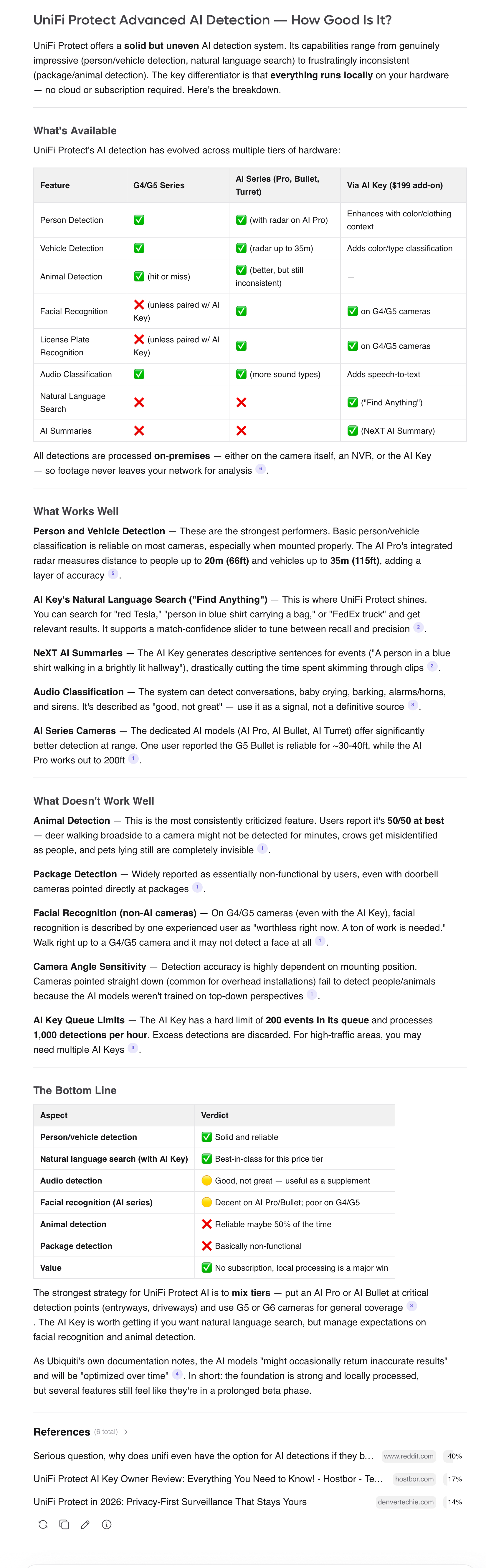
Taking a cue from Ben I asked DeepSeek V4 Flash to assess UniFi Protect's advanced AI features. Sounds like I was right to suspect that they are not terribly reliable. In fact even simple animal detection, which SecuritySpy does so effortlessly, sounds iffy.
Even UniFi's dedicated hardware AI Key does not seem able to do what Ubiquity promises reliably, and it has pretty serious hardware processing limitations. Perhaps showing the wisdom of Ben's Mac-based platform.
This exercise strengthens my guess that Ben has only implemented the AI features that "just work." With Apple's forthcoming hardware and software AI advancements, and the rapid advancements of the field generally, I wouldn't be surprised to see more of these sophisticated AI features in SecuritySpy at some point.
I do like Protect's tight integration of video surveillance with other UniFi capabilities such as physical security sensors and alarms, though I suspect SecuritySpy can also achieve such integrations via HomeKit, etc.