Home Assistant integration

First, I want to be clear that what I'm talking about isn't the brand-new addition Home Helper got with Security Spy 6.18, I just happened to have good timing! My HomeKit setup has been less than reliable at communicating with Home Helper (I have an older Apple TV running it) and I'm a Home Assistant user anyway, so I decided to explore Bjarne Riis' old HA Integration last weekend, and with a lot of prodding to Claude Code managed to get it working again, and added the schedule presets as a dropdown menu. One of the best uses I've gotten out of it so far is to make an automation check to make sure the "Actions" toggle actually switched when I selected the schedule preset. This could also really be handy if you wanted to directly control Security Spy's "Actions" or "Motion Capture" setting directly from something in Home Assistant. So here it is in case anyone else can make use of it.
Comments
-
That’s great news. I tried the home helper, and it’s awkward at best.
The integration was nice. I just worked, no making fake switches and messing with the home helper to see them, etc.
Thanks for taking this on!
-
Glad it worked for you! My plan is kind of a hybrid approach-using the HACS integration for toggling the schedule presets or individual camera's actions, and then adding an input boolean from Home Assistant for each camera in the Actions section of Home Helper. Then I can use those input booleans to trigger automations in Home Assistant. This is a big win for me since I'm away from home 5-6 days at a stretch for work, so the only way I have to edit stuff in Home Helper is via screen sharing, which tends to be kind of slow, while I can edit Home Assistant automations from my phone.
-
This is great work Josh. Thanks so much for taking over.
-
Claude and I updated this today to fix some stability stuff I'd experienced, namely that the integration silently failed if I restarted my Mac or Security Spy. I also changed the way cameras are added, since I'd noticed that they'd be added multiple times if I swapped cameras around in Security Spy. I also got the "reconfigure" button working in Home Assistant, so if you change your Security Spy password you don't have to remove the whole thing from Home Assistant and add it again. Anybody that runs across this, feel free to reach out with suggestions! The Security Spy API exposes other stuff that could be useful, like schedule overrides, it's just not stuff I use with Home Assistant, so I didn't add it. I'd be glad to put it in there if it could be helpful to someone.
-
Hi @JoshADC
This looks cool. I just got Home Assistant installed in a UTM VM on my Mac Mini M4 alongside SecSpy, and I'll be diving into HA soon.
I have a feature request for you right out of the gate 😅 before I even attempt to install it: Could you add support for camera enable/disable parameters? In my current Hubitat/MakerAPI driven automation, I do this:
I built a custom Hubitat driver for virtual switches that enables me to send a series of SecSpy webhooks for the switch On and Off states. I built the driver so I could sort of conveniently abstract out the URL in the virtual switch configuration and focus only on the SecSpy commands. In my virtual switch prefs, it's configured like so:
Server URL: [url]
Auth Token: [token]
ON Sequence:
POST | settings-cameras | cameraNum=1&enabled=1 | 2000
GET | setSchedule | cameraNum=1&schedule=1&override=0&mode=CMA | 250
OFF Sequence:
GET | setSchedule | cameraNum=1&schedule=0&override=0&mode=CMA | 1000
POST | settings-cameras | cameraNum=1&enabled=0 | 250
So in those examples, the ON sequence enables a camera, pauses 2 seconds, then arms CMA, and the OFF sequence disarms CMA, pauses 1 second, then disables the camera. The virtual switch gets triggered by alarm arm/disarm rules, home/away status, etc...
Why explicitly enable/disable the camera? Because, for my interior cameras, I don't want any video streaming into Security Spy at all when I'm home (so it's not grabbing AI review frames, etc - maintaining interior privacy for everyone).
Anyway, I'm soon going to undertake transitioning all my Hubitat automation in to Home Assistant (not a small task) so Hubitat just functions as the radio. I look forward to experimenting with your renewed SecSpy integration in Home Assistant once I get to that point.
I'll be happy to contribute too, once I get HA fully up and running...
Any chance you want to enable issues and/or discussions on your repo, so I can write issues/features there? I'd enjoy contributing to your repo vs forking...
(BTW - if you have a Roku TV, check this out: 😀)
-
You got it! The "Enable" toggle switch will be available when you get the integration going now, but it will be hidden by default since it's using a POST request instead of a GET request like the rest of the integration-and also because I'm afraid I'd fat-finger the toggle in the HA app. Just click where you see the "+1 disabled entity," hit the gear wheel, and then toggle the "enabled" switch. Home Assistant should then tell you "The enabled entities will be added to Home Assistant in 30 seconds." (This is confusing to type, because the entity is called "enabled," but you also need to enable the enabler. Enabling you to enable the enabler really makes me sounds like a bad person.) I think you'll see what I mean when you get there.
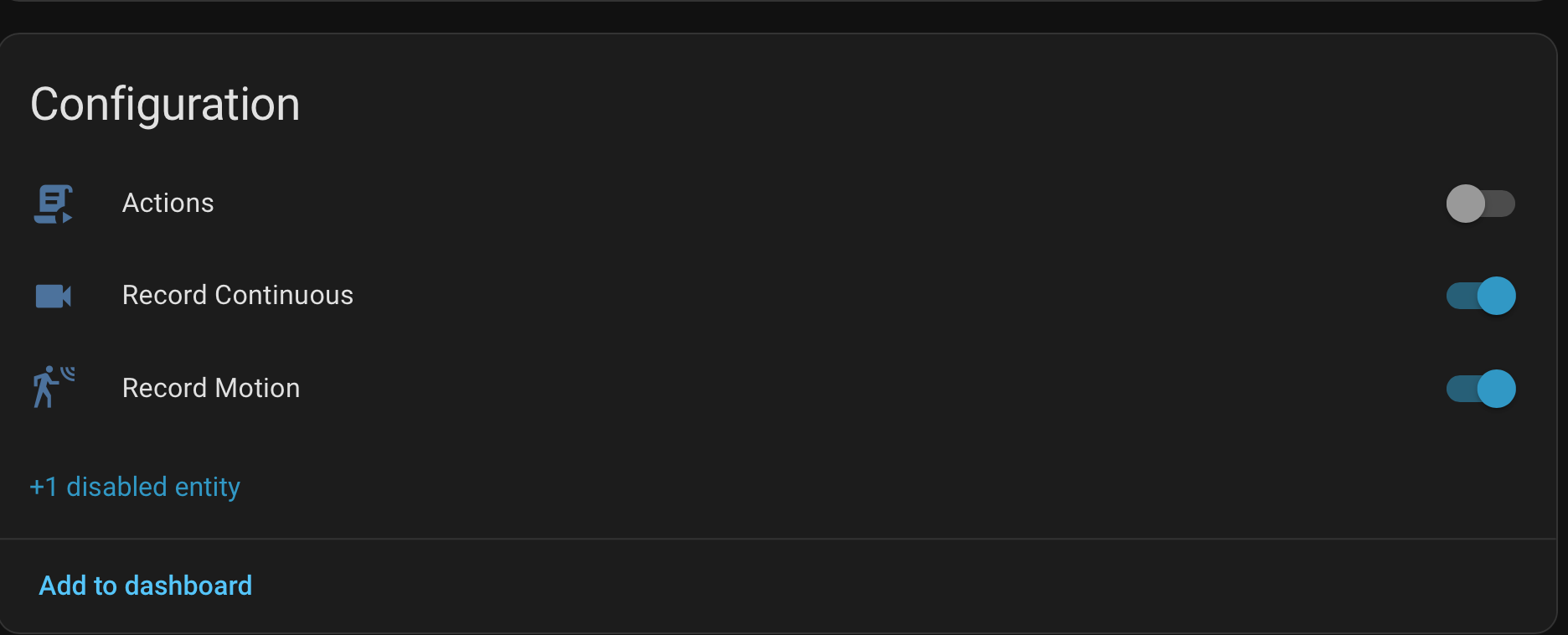
I'm such a GitHub rookie, I didn't realize I had issues and discussions disabled, that should be fixed now.
Your Roku setup looks like it'd be slick! I don't have a (running) Roku, I just got a new Apple TV because my old one was being flaky about HomeKit (which was the reason I wanted to fix this Home Assistant integration in the first place) but I kinda want to break out my old Roku just to try your viewer.
-
Yeah, I'm not github expert either. Like you, I'm vibe-researching & vibe-coding my way through all of this, though I do have some pretty deep knowledge of security spy and it's API's at this point. Eventually I'm going to publish a supplemental app I've built for SecSpy that does some pretty cool stuff, but...later on that...
Re enabling the enabler...I get it...kinda...will review... 😅
...reading the comments in your commit, I see how you're thinking about it "It's meant for # setup (e.g. disabling interior cameras when home), not routine toggling."
I guess that might be true in some sense, but in fact my home automations do routinely toggle camera enabled/disabled state to serve the privacy purpose I noted. And that does create some overhead, because when a camera is disabled, then enabled, there has to be some detection of that in the supporting app. I monitor the SecSpy event stream for config changes and then act accordingly...
That said - @Ben it would be kinda cool if we could "mute" a camera vs entirely "offlining" it? Mute would mean: the camera is still 'enabled', but no video/audio is processed, no motion/AI detection occurs, etc? I'm not sure if there's enough of a distinction for it to be a separate feature, except with regards to how it's handled by downstream apps that rely upon querying the SecSpy API for camera state. What do you think?
-
It's not that I don't think you have a great use-case for that switch, I just mean that it's doing more than just toggling a schedule preset. To do this in the UI, you have to change a setting, then save, and the camera disappears from the list, like it's not even counting towards your license anymore. The mute switch would solve that part of it, or maybe a whole screen privacy mask? And not to make you paranoid, but you've still got a camera inside that's got power and is on your network unless you're also cutting power to it.
I'd be interested in seeing your app. I built myself a little flask app running on the Mac that waits for the "Actions" tab in Security Spy to fire a shell command on "human moves," watches for new still images to drop, then sends some of those images along with a bunch of context and reference images up an Anthropic API call with a prompt like "you're reviewing my cctv footage because I'm driving, let me know if I should pull over to review it..." The Flask app then sends me an iMessage so Siri can tell me what's up without me having to watch the footage myself. It's clunky, but it works, and I'm not itching to pull over to watch a video that just ends up being somebody cleaning up after their dog in my yard.
-
...and another day, another small update. The AI detection score sensors for Human, Vehicle, and Animal should be exposed now. These just show up as sensor entities so they can be used independently or in any combination to fire off automations, work with Bayesians, handroll your own binary sensor, etc.
-
>I'm not itching to pull over to watch a video that just ends up being somebody cleaning up after their dog in my yard.
😅 That's a pretty good idea. When you do this part: "sends some of those images along with a bunch of context and reference images up an Anthropic API call", are you feeding a local model, or the cloud? I just got a Mac Studio with 512GB of RAM right before Apple announced they're no longer offering those anymore (a mere 256 GB is the limit now). It's a work computer intended for other purposes, but I'll have to try your idea. I did a bunch of experiments a few months ago with this model:
https://huggingface.co/apple/FastVLM-0.5B
...relating to digging metadata out of live video streams, running locally...and the results were quite impressive...actually astounding...and I was only running a 32GB Mac Studio at the time...
>not to make you paranoid, but you've still got a camera inside that's got power and is on your network
Trust me, I'm hip...and I was paranoid a long time ago. My cams are locked down on their own VLAN, no cloud comms, no internet. They can only feed SecSpy, and SecSpy is locked down with Okta + Tailscale. See some of my other posts in this forum...
>I'd be interested in seeing your app.
I'll get it published eventually. It's a bit complicated. Been chipping away at it for about 6 months now. My problem with vibe-coding is that I'm too cautious to just recklessly "vibe". I have to review every line, and I rewrite a significant percentage of what the AI comes up with, though the AI is getting exponentially better every month, or so it seems. Singularity coming soon...
-
I'd love to eventually get a local model working, but the 16GB M4 Mini Security Spy runs on is the only thing I can realistically run a LLM on. I just use a regular Anthropic/Claude API call, nothing special, just Sonnet 4.6. It uses about 17k tokens per event, does multi-camera context, and ends up costing me $7-8/month in tokens, so it's hard to justify buying hardware just for that-the mental cost of it not being local is more than the actual cost of running it. I drive a truck for a living, so I'm gone from home for several days at a time, and got Security Spy because I'd been meaning to get cameras around the house for years. I pretty quickly discovered that as nice as getting notifications about people being detected was, not knowing what they were up to while I was driving made me want to find somewhere to stop and check the (usually) harmless video. The iMessage description is pretty nice, Siri just reads it over CarPlay and there's almost always enough context to put my mind at ease.
That studio sounds like a beast! I'm sure you could run something big enough on that to do what I'm doing with my API call with room to spare. I'll check out that FastVLM. I've been playing with a 4b Gemma model this week with Frigate NVR, but that's basically a hobby to try to learn what a little model will do. Security Spy has been so reliable at sending good stills to my ClaudeVision/iMessage app that I just leave that pipeline alone.
-
I inadvertently made a breaking change on this in version 1.3 that could orphan entities for some folks trying to fix bug in the integration where moving or disabling cameras in Security Spy could create duplicate cameras in Home Assistant. The fix is out now with 1.3.2, and should work without orphaning entities for folks that added the new integration at any point. Holler at me here or on GitHub with any issues.
@photonclock , I tried the larger version of that model, and it was a learning curve I didn't know a was about to navigate! It didn't work out for what I wanted to use it for, but it led to me figure out a better way of using qwen3.5:9B so that it's usable on the Mac at the same time as Security Spy. My last message from it while I was trying to stress-test it with what ended up being 21k tokens was
"Josh in backyard and front porch at 10:39-10:41 AM wearing plaid shirt with blue denim overalls, walking from backyard through east side yard to front porch, standing on porch and in yard for approximately 45 seconds across Back East, East corner S, Front Door, Front Floodlight, Porch East, and Porch West cameras. No concern - known person (homeowner) moving around property normally."
I did get this gem out of FasVLM when I was running it though-not totally accurate, but I think the 'Possum would be proud.

-
You drive a truck for a living, and George Jones is your go-to test data?
I believe I have just learned a great deal about who you are, sir. High-tech Redneck for the win! 😅🇺🇸🔥
>>qwen3.5:9B so that it's usable on the Mac
>>"Josh in backyard and front porch at 10:39-10:41 AM"
Yeah, that description is impressive, doubly so given you're saying it identifies you as an individual? How is it doing that? Did you tune and/or ground the model on some training data to recognize you? I'd be very interested in a write up/read-me as to what you've done there, even just a high-level overview?
Why didn't the FastVLM model work?
I'm happy that I inspired you to ditch the cloud. That's always a win.
-
The biggest problem with FastVLM (the 7B version I used) was the long text prompts I fed it to try to get it to describe the action in a scene. It would end up repeating some version of the prompt almost verbatim. It was great at "Describe this image" but not so good at "You are a security officer reviewing CCTV footage...." It evidently was trained from Qwen2, and the Qwen models have come a long way since then. It turns out a picture is better than a thousand words for baby LLMs too!
I really do need to make a good write up on this at some point, but it's a real moving target. In broad strokes, when Security Spy's actions trigger, which for me is just set for triggering on "Human Moves," the shell command it fires starts a folder watcher for new still images to come in. When they stop coming in, or two minutes after the first one comes in, the flask app grabs eight of them and sends them and a huge prompt that includes reference night/day images and pictures of known people, which is how it named me. The big downside to that is just suggesting it compare an image of a known person to a new, unknown person makes it into a matching game for it. The big brain LLMs aren't immune to this either, they try really hard to match people, so I'm thinking about removing that whole section. Anyway, it takes all of that, is told explicitly to use certain keywords, and send its response back in a format that's easy for Siri to read me through CarPlay. It takes an API call about 30-40 seconds and the 9b Qwen about 160-170.
I'm working on another version now that will run the images through in series with decision trees where the bot just fills out a json template. "Are there people in this image? Yes/no" kind of logic, followed by getting it to describe them, whether they're wearing a uniform or not, etc, and then to a third stage that determines where they entered the scene, where they left it, and how long they were there. The last stage will ask it to compare the image immediately before the person entered and immediately after it left and make note of anything taken, left, or altered. Then all of that info gets pasted in a template and sent off as an iMessage. The hope is that it'll be faster and lighter-weight than a giant prompt with a lot of decision making by an LLM.
-
Have you played with Vertex and/or tried tuning (vs grounding) your own models?
This will send you down a very deep, dark, rabbit hole...
-
Ok, finally got time to get this installed. Pretty sweet. I'm definitely going to start building out Home Assistant and transitioning away from all my Hubitat driven logic & UI.
I have some feature requests! Will post on github, though I may take a crack at some pull requests on this myself too...
Nice job!
-
Feature request/pull request away! It sounds like you understand the API better than I do. Working on the SSL thing now, plan is to add a verify ssl option.
-
Have you tried running llmvision integration in home assistant? Beta has its own model that u can use soon i think.
-
I have tried the LLM Vision integration. Whatever system prompt it had was too much for my little models. I needed something that ran on the Mac so it could send me an iMessage anyway. I’m going to check out that beta though, if it’s something lightweight that gets the job done it’d be really useful.
