Light bulb style cameras

Just wondering if these things could be used with SS, or at least viewed in a web browser... or are you completely locked into their phone app besides SD card? Thx.
Comments
-
It's possible - according to this document from LaView's web site, their cameras support RTSP, and the RTSP URLs they use are the same as Hikvision, so their cameras should work with SecuritySpy using the Hikvision profile. However, this document doesn't specifically provide a list of camera models, and it's not certain whether the lightbulb camera you refer to would be covered by the document, so it's still not clear whether this camera would work with SecuritySpy. You could try contacting LaView to ask them if this specific camera supports RTSP, or you could buy and try it (but make sure you'll be able to return it before you purchase).
-
Thanks, Ben.
-
I didn't even know these existed! Thanks for asking this question and providing the link. My Dad has been interested in putting some security cameras up, but solar and/or battery just isn't really practical for him, and retrofitting either power or POE was more trouble than it is worth. This may be the answer!
-
No problem, but it should be noted they may not be very good... I just saw someone asking about them somewhere, and was curious, no real use myself. Although if they doubled as light bulbs I might be more interested :-)
-
Yeah, I did a bunch of research on them and came to the same conclusion… haha
Shame, because there’s no reason they HAVE to be bad.
-
I've sampled and returned over 5 'bulb cameras' from amazon.
These Jennov 2K light bulb camera's are inexpensive and are onvif enabled by default.
Support Zoom on KB and PTZ. Currently running 3 of these outdoors on the gulf coast.
Last about 2 years outdoors under eve with duct tape over the memory card slot.
https://www.amazon.com/dp/B0FBWWD6Y6?ref=fed_asin_title&th=1
-
Ovation6 how well has that been working with SSpy?
they look like they fit that 'too good to be true' window.
-
Upon reading Ovation6's comments, I purchased two of these. All cameras heretofore have been wired, but I tried two of these. The final price after tax was only about $16.90 USD at the time. They work great with SecuritySpy. You can set them up using the ONVIF profile.
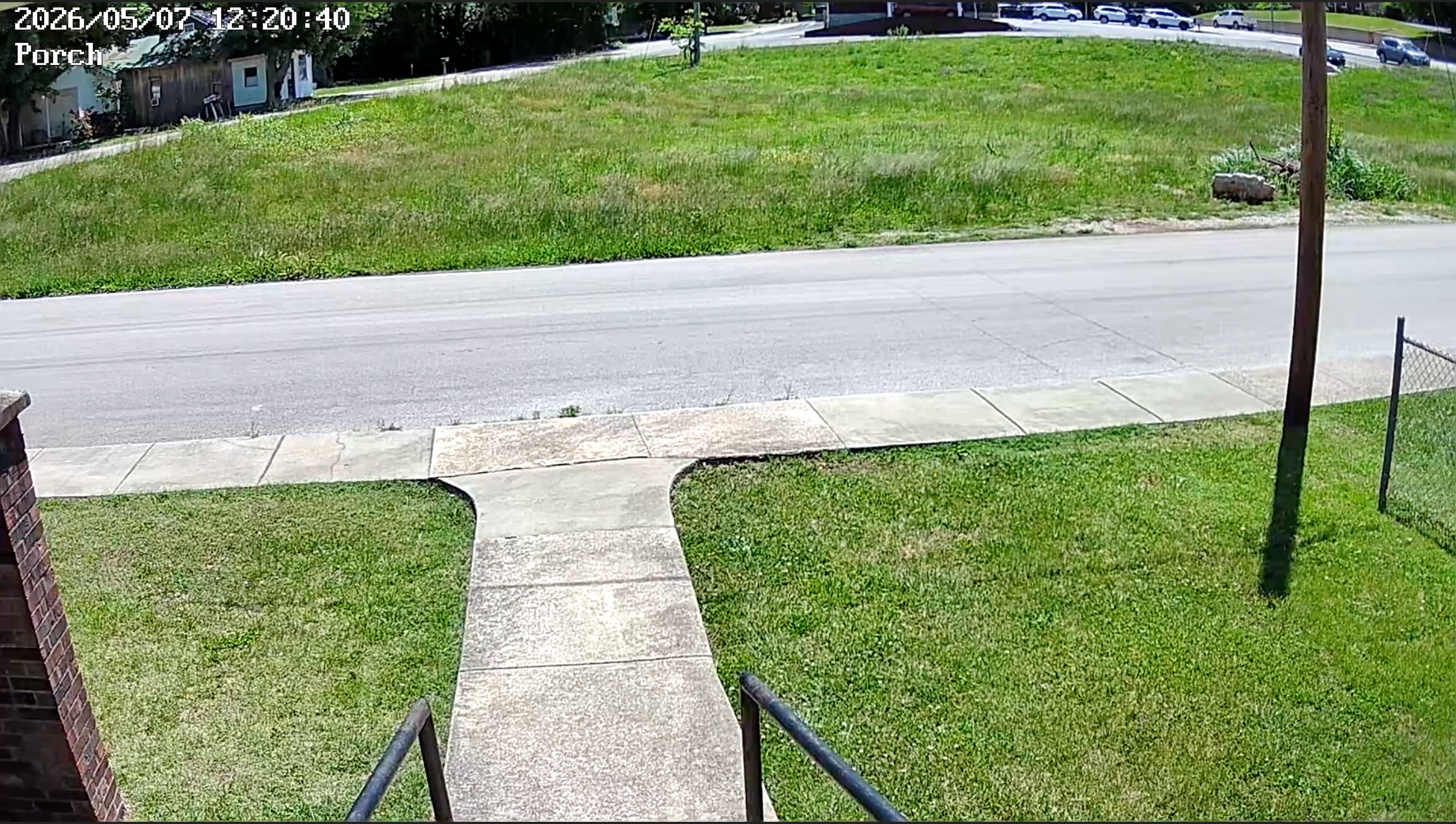
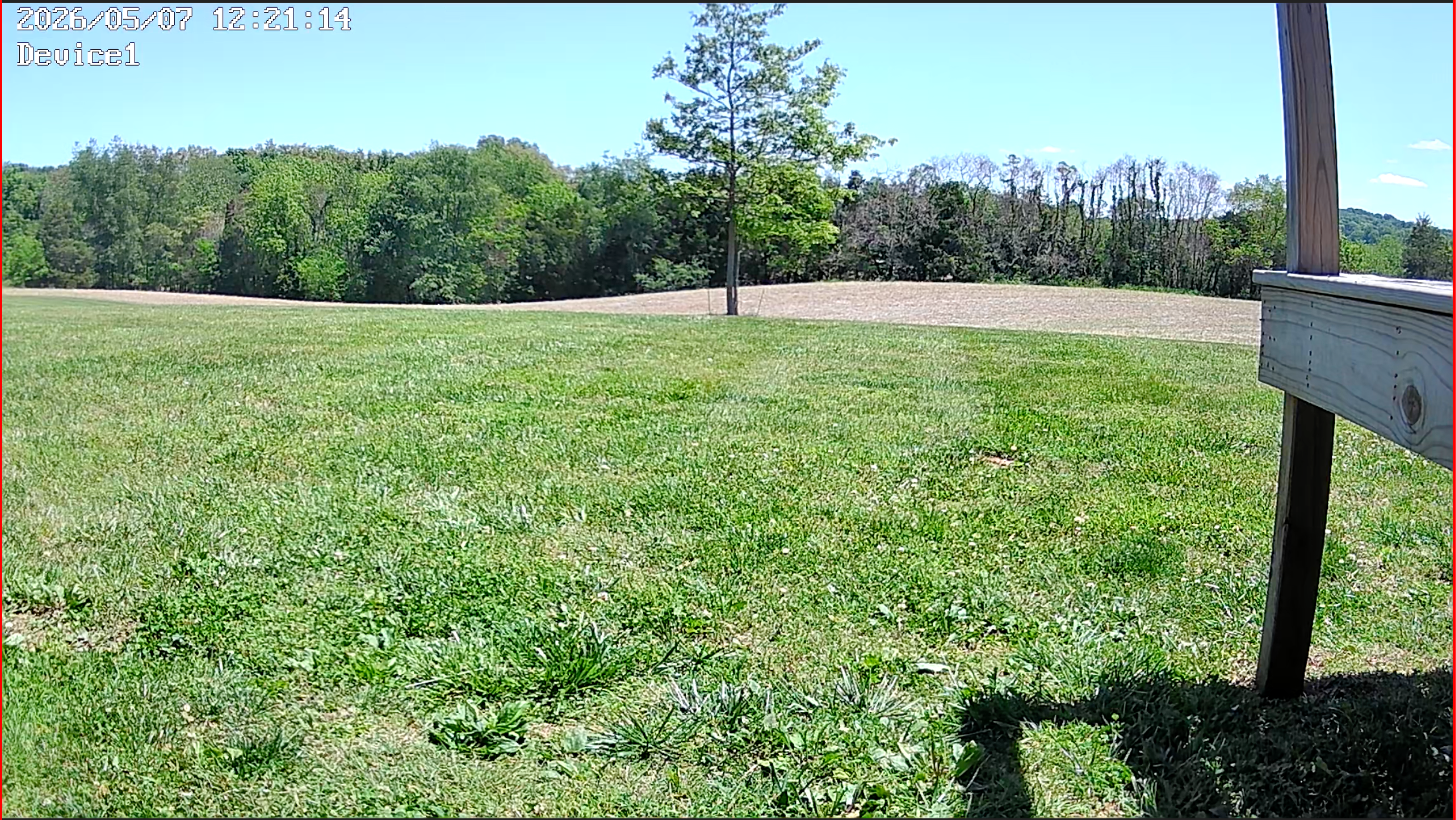
They, unlike many at this price point, have 5 Ghz wifi. The 5 Ghz really keeps a solid connection. The top picture is at our Church building looking off the front porch. The second is looking out across our backyard at home. Both screenshots were taken just a few moments ago on May 7, 2026. The only issue I've run across is recording audio. It simply cuts out the video when I try audio, but that is not needed where I have them. (I'm going to revisit this issue and hopefully get it resolved.)
Picture # 2 (out the backyard) is located outside and gets a lot of rain and more exposed than the one at the Church building. I thought I would try them, and have been extremely pleased. They work fine for what we need. They might not for you, but for less than $17 each, I thought I would give them a try. I'm glad I did. As you can see, the quality is quite good.
Marty
-
Thanks Marty. You purchased the ones linked in the OP or the ones linked in Ovation's comment?
What was setup like?
-
You're welcome, and my apologies. I was not clear on that. I got two of these.
Set up was extremely easy. I used the camera's iOS app to find the ip address then logged into the router and reserved that ip address to the Mac address of the camera so it would not change. There was no way to set a static ip address in the camera.
But, set up was quite quick and even now I'm viewing both cameras and they stream to SecuritySpy perfectly.
If you get them and can't get them set up, come back here and I can talk you through it. The only "hard" thing is forcing the router to always assign that Mac address to a particular ip address, but it's not really difficult at all as long as you can log into your router.
Marty
-
Thanks, currently don't have anywhere to install one that would be useful in any way.... not sure I understand this, but I suppose I'd figure it out if I had to.
<<<<<reserved that ip address to the Mac address of the camera>>>>>>
-
As a bonus, the cameras each came with an adapter to plug them into a standard AC socket. That would make a great hallway or garage camera. All you need is an AC socket.
As far as the IP address, many computing devices, and more advanced cameras, like Amcrest, let you assign a static ip address to it that never changes, like 192.168.1.127 for example. You cannot do this with the Jennov camera. The router assigns an address to it that can change often, and there would be no way for SecuritySpy to know that address the camera is.
In this situation, you log onto your router, find the address of the light bulb camera that is reported by the camera app. You then tell the router to "reserve" this IP address just for that camera. That way it never changes and SecuritySpy can always find it.
It sounds a little complex, but it's not really.
As I mentioned earlier, I do prefer wired cameras, but these were in places that didn't have any ethernet cable and I tried them as an experiment. I like them so well, I might purchase a couple more just in case one goes out. They are exposed to the weather. I did cover the SD card slot with weather proof duct tape as mentioned by ovation6 above.
They are not my first choice of camera due to being wireless only, but they do work perfectly with Security Spy, look great, need no SD card, and do not have to use their app to view after the initial setup.
Hope this helps. I can understand sounding too good to be true, but they certainly have exceeded my expectations.
Marty
-
wild. @Marty, how responsive are the PTZ controls?
-
Caseyd, sorry to be a bit in responding. The PTZ works great. It works in the native app but I find it even more responsive in SecuritySpy. I just press and hold and it moves very smoothly.
At the $17 price, these cameras are basically disposable so I've subjected them to a lot of weather, and they just keep going thus far. I'll follow up if they go out, or any major issues.
Marty
-
I'm going to put a couple up out in the Redwoods, where they will be subject to massive rains and bananna slug inspections.
-
Let us know how it goes. Mine do sound like they are exposed to that much rain. Even the one with the most rain is under an eve of the house but close to the ground at an outlet. It gets a lot of moisture, but not the slugs that I know of! 😀
-
The above should have said mine are NOT exposed to as much rain as you are looking at. I'll be interested to know how they perform, etc. Thus far all is still working great here with two outside, although one never gets wet.
I'll report back with any major issues. Even being wireless, they have been quite reliable with the 5Ghz.
-
Hey Marty, I'm back :)
So far Camera 1, Bananna Slugs 0. but this is due to the camera being pretty high up under the eves.
Let's start: it's a $17 camera! wild. Or it was as last I looked it disappeared from Amazon.
SSpy found it after I nailed down the IP, which I reserved in my Untangle at the same time. Good enough.
The default app on my sacrifice android phone is 'fine' but keeps pestering me with upsells. I think the only reason I'll keep it around is to install another couple of these things, and to restart them.
I'm connecting via ONVIF and for kicks H2.65 RTSP. <- open to advice on that bit. locked down to 10fps on Ben's side of the deal.
I haven't been able to get the devices night vision to kick in. It has quite the array of LEDs so I keep hoping. looking for advice on that. This would be great because it's pitch black under the redwoods, and neighbors are sensitive to light. the dim white light from this cam offers a perfect compromise.
The 'detect hooman and track' camera-side seems to work, but the 'at night detect hooman, illuminate and track' does not. most likely related to the night vision IRs not turning on.
From the android app I can trigger the white light on the camera. <- I would like to be able to trigger this from Security Spy, any idea? I would be happy to have SSpy fire a local script which ran a curl or wget against the camera but...
If I do anything in SSpy's PTZ controls to adjust image quality the camera goes nuts. see "why I keep the default app" and by nuts I mean goes black or blackish grey scale.
I haven't tried the PTZ patrol from Ben's side yet. I'm not sure if I need to do any special 'control clicks' in SSpy to lock in PTZ points anymore or what.
Overall; Ok an OK supplement camera.
My cameras are a mix of Axis, Ubi ( the old ones ), Lorex, Duhhaaaa. host is an intel Mini i7 maxed out, dropping video into an OWC ThunderBay. LAN is mostly hardwired but multiple TPLink WAPs and a Ubi wireless bridge to outbuildings.
-
Casey,
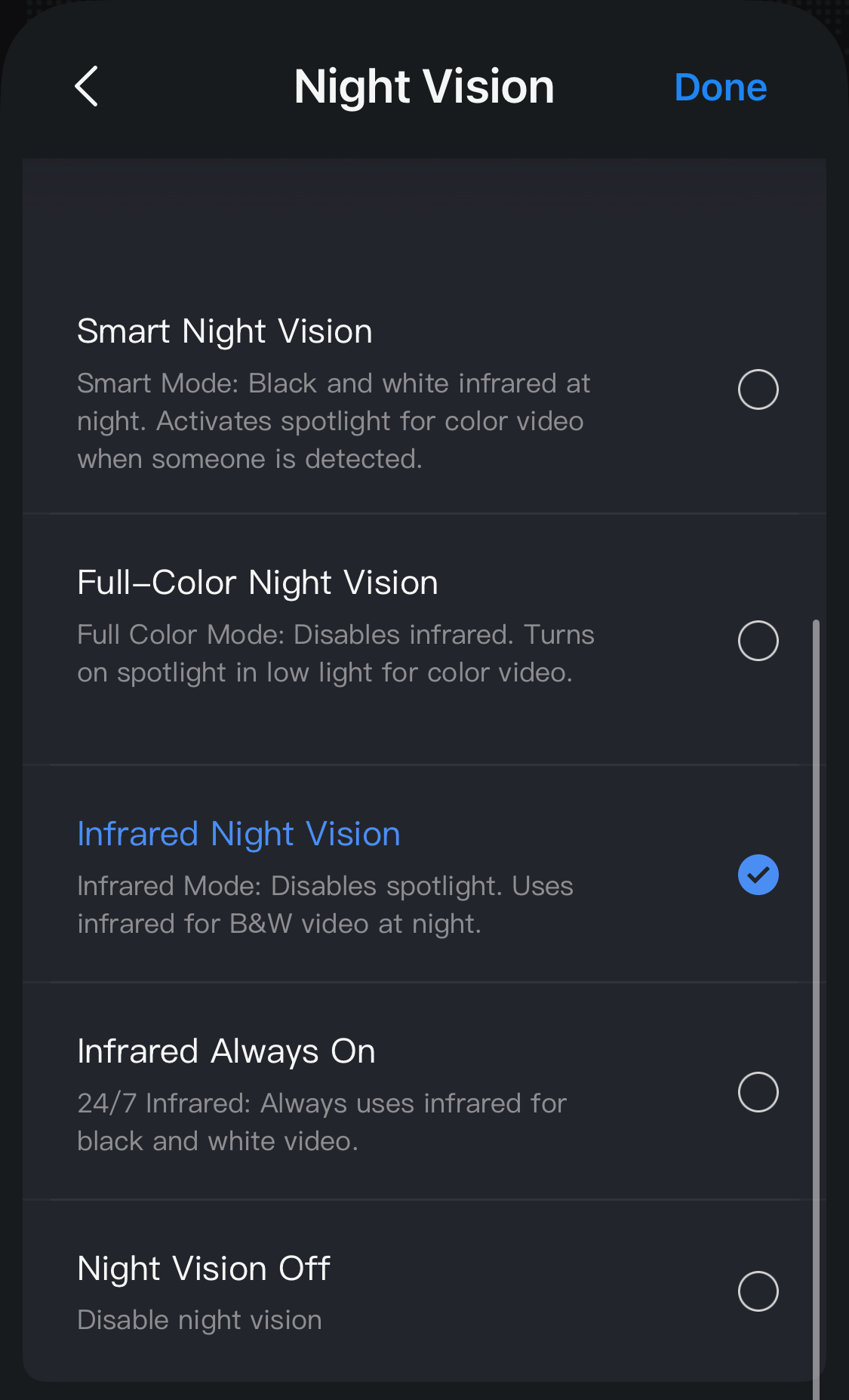
It's great to hear all is working mostly, and for $17, that is easily a meal out for two. And, no banana slugs! Below is the light sitting I use, and it kicks in perfectly each night. Also, as you noted the cameras are no longer available but they are back in white. I did find another, even higher quality on Amazon I will link below. They are to arrive in the coming week and I'll report on them when I get it going.
I did upgrade my SecuritySpy license to 32 and I have room to experiment. I honestly expect to go to unlimited soon, and I will experiment with using a lot of other inputs.... web cams, screens, and just testing cameras.
Here are my night vision settings and the link to some 4K light bulb cameras that are coming next week and they really push they are ONVIF/RTSP.
Note the cameras above are $50 each, but if you get the four pack, they are $35 each.
-
Ah I get it, perhaps. I am trying to use the Smart Night Vision option, which then is supposed to turn on the white floodlight. The pleasantly dim floodlight I am hoping to help light the pathway "on demand"
I'll look around for some kind of rule in their on-camera settings to turn on the white light as the result of motion being detected.
I was out there last night ( 4th of july weekend for us USAians ) with my phone tinkering with the settings. I could see the white light showing my phone's display, but no go with IR.
( also the low-light saturation is pretty poor, but it is $17 camera! damn! I am going to put one in the crawl space to try and catch raccoons / bobcats / mountain lions )
thanks Marty! I have 3 SSpy installs, I need a package deal ;)
-
Adding a comment, that I did order the four pack of the above cameras. Already pressing the 32 camera license! I expect an unlimited license to be in the works soon.
SecuritySpy does turn the Jennov camera for me, but I don't do it often. I feel that a $17 camera doesn't have a lot of life in the gears.
With the four cameras coming, I'm going to replace one of the Jennov and put it in the attic just to test. I had read somewhere they could handle up to 140 F. I'm going to test that. I don't need to see in the attic, but just a nice test and can use the white light to check things. I've acquired so many cameras and have the licenses that I'm going to do some experimenting.
Marty
-
well, ironically, we were thinking the same. I think I will do the attic. In case I hear a critter or think is the roof doing okay. I too am in the USA. Kentucky and we have such hot humid summers and cold winters. I just want to see what the camera can do.
I do have light sockets under the house under a crawl space. That is a possibility as well.
You might check out that pack of four Eversecu I linked. I cannot say they are good yet as I'm waiting on them to arrive. But, I'll report back with findings and photos. And, I did like the fact they say they are "Outdoor Waterproof" and for sure ONVIF/RTSP.
-
what I think is happening is that whatever our Spy pal is sending as camera controls for the imaging components of this thing are not implemented correctly on the camera side. Perhaps "correctly" is too strong; but implemented differently.
I just had to drop the camera from the obnoxious vendor's app to pull off a system reset, as trying to change the Saturation from the Spyside caused the image to go black.
when it came back ( thanks DHCP reservation ) the color was back to normal - namely quite good for the price.
I am not having any luck getting a tour going from the Spy side. Waiting for a report on those Eversecu cams. I have a couple of their ham radios; pre-MARS-mod if you will.
-
say Marty, do you have a memory card in your cameras? I am wondering if since I don't there is some kind of missing storage from the camera's firmware POV, and so it gets confused when it gets commands.
( yes that would be a stupid way to do it, but )
-
Casey, just to comment my wife and I both are long time Ham radio operators. Perhaps explains why I like to tinker so much. I had a packet BBS up for years. No doubt that predates you.
We had a brief power outage and I could not wake up the Jennov light bulb camera. We had 10 inches of rain and I think some water got in it. I pulled the SD card and all was fine. I never reinstalled it and just recorded to the Security Spy computer.
i think the SD card actually was an issue. At least for a while. Marty
-
I may well be predated! But I did dial-up to the Well quite a while ago - after sneaking my way into a set of time-shared APL terminals to play Star Trek on teletype.
-
Dial up was part of my past as well. After on air packet BBS dial up was next. Today is so much faster etc but those days were exiting steps to where we are now.
Going to be a few days arriving but will report on these new 4K light bulb cameras.
Marty
-
Casey, and others,
I don't like to have to give negative recommendations but I can say to not purchase the Eversecu Lightbulb cameras I linked above. I bought the four pack and within a few hours once just stopped powering up. The quality was good through the app, but the RTSP stream would not work reliable at all. It would run literally for 1 to 2 minutes and just stop. I could get a more reliable stream if I changed the stream request to low quality, but it didn't look good at all. That streamed stopped as well after a bit. I did a little digging and others reported the RTSP stream was very unreliable.
I have all four boxed up and ready to return. They just simple wouldn't work reliably, and one not at all. Thus far the best lightbulb camera with RTSP streaming is the Jennov. They have worked for months now with no issues.
Marty
-
Marty, you are a fine example of the worthy benefits of being in the Ben community!
-
Thanks, but not really worthy of that, but I do enjoy the forums here. I learn a lot and hopefully I can pass a few tidbits to others.

