Camera not seen....

I have one of these, using it happily until my garage was torn down in June.
I finally got it mounted back up on my new garage today. Powered right up. I've changed nothing in SS, routers, camera (other than sitting unplugged for 6 months.) Was really hoping I'd be right back in business but it's not seen by SS, trying to connect via web interface gets me just barely into the firmware after 20 reloads but to a screen that says "IP camera Welcome" with no options to do anything )I suspect it doesn't finish loading.) An IP scanner does readily recognize that there's a device on the IP that I had set for it way back when. I don't expect anyone here to magically solve my problem (and I recognize it's not a Security Spy problem) but was hoping for suggestions from those who goof around with cameras more frequently as to anything obvious I might not be thinking of to try, thanks.
Comments
-
Is this camera connected by wired Ethernet or by WiFi?
If it's WiFi, then the primary culprit here is going to be the strength/reliability of the WiFi signal. Make sure the signal is as strong as possible (e.g. by moving the access point closer to the camera). If possible, connect the camera by wired Ethernet instead.
If you are seeing this problem when the camera is connected by wired Ethernet, then that's not a good sign - the camera could be going bad. But there are two additional things to try in this case:
- Factory reset - it looks like there's a reset button on the cables coming out of the back of the camera; hold this down until the camera reboots. Then try to locate/connect to it again.
- Check the Ethernet cable that connects the camera to the switch; try a different cable.
-
Thanks for the response. It's wifi. It's mounted to the garage across the yard in roughly the same place it was before when it was connecting. When I came home last night I power cycled it and it was showing up for a short tie but kind of faded away as I was trying to tweak the settings in a browser.
I hit the reset button a few hours ago... I think that means I need to go through the whole initial setup process?
-
Yes, after you reset it to factory settings, you'll have to go through any initial setup that the camera requires. The main thing you'd need to do is to give it the WiFi details, and this would require you to temporarily connect the camera to your router/switch by wired Ethernet. Once connected by wired Ethernet, the camera should be discovered by SecuritySpy and you'll be able to open its web interface in a web browser to set its settings.
This would actually be a good test in itself. If the camera responds and performs well when connected by wired Ethernet, then you know that the WiFi signal is the problem. If you see the same connection problems via Ethernet, then this indicates the camera is going bad.
-
Thanks. I'll have to climb a tall ladder and unmount it to set it up unfortunately. I'm fairly certain the wifi signal is the problem-- just don't understand what changed since it was last running in June.
-
Yes, it's probably the WiFi signal. Many things can affect the signal quality: obviously the distance between the access point and the device, but also: number of other devices on the same WiFi network, interference from other nearby WiFi networks and even from non-WiFi appliances like microwaves, relative orientation of the sending/receiving antennas, material of any walls in the way.
Assuming your WiFi access point is dual-band, one thing you could try would be to set different SSID names for the 2.4 GHz and 5 GHz bands, and then try connecting the camera specifically to the 2.4 GHz network. 2.4 GHz signals are slower but provide better range than 5 GHz.
Another thing to try would be to reboot the router/access point frequently; when it starts up, it should automatically detect and choose radio channels that have the least interference.
Is it possible for you to run a permanent Ethernet cable to this camera? This would be the best solution.
-
Thanks for the suggestions. There's really no way to run an ethernet cable--- hanging it over the yard wouldn't be the end of the world but there's no way to get it through the wall without drilling into the brick. I do have an old powerline ethernet adapter in use that I can borrow and try, even though the garage is on a different circuit than the router. Good suggestion about the SSID names... it would be a pain as I have several repeaters in use and I'm not confident I can remember how to change their settings, but I suppose I could just change the 5 ghz name in the router controls as a test and force everything into the 2.4....
I have tried cycling the router a bunch of times and it doesn't seem to get the problem camera seen.
I have so many pending projects taking over my days off work, didn't need another one... thanks for listening and helping.
-
I am getting close to being ready to taking a hammer and smashing this thing.
I got it all set up again, gave it the wifi IP it had before, disconnected the ethernet cable, no problem. But it only connects when plugged on close to the router and computer. No connectivity in the next room. Baffling....
Router shows it connected via 5G- I'm not sure how to force it to 2.4 (although I can't see how that can help, considering how extreme the connectivity problem is.) I do have separate SSID names for the two bands, and I entered the non-5g name for the network in the camera's setup.
I've tried different antennae.... I've had the antenna mount come loose on other cameras but this one has been solid.
-
I'm using WiFi extender type devices to boost weak WiFi cam connections. My system is all eero devices now, but older Apple or tp-link devices would work, too depending on what hardware you're already using.
My assumption is that the cam's WiFi capabilities are minimal, while a dedicated WiFi extending device will be much more powerful.
I co-locate the extender device with the cam, use the same power source as the cam, and physically connect the cam to the extender using a short ethernet cable. Then I turn off the cam's WiFi altogether, as it thinks it's wired.
The WiFi extender does the WiFi work.
If you're interested in knowing more, I can look at your setup and recommend certain specific extenders that might work for you.
-
This is one relatively inexpensive device that would work.
https://www.tp-link.com/us/home-networking/wifi-router/tl-wr902ac/
Its "Client Mode" will make the cam think it's wired to the network.
No external antennas.
Apple Airport Express models A1392 or A1264 (no longer in production, but still available on eBay) will do this, also.
-
Once you've physically connected the extender to the camera, if there's someplace in the garage structure that might have a less obstructed signal path to your router, you can place the extender in that location, using a longer ethernet cable to connect to the camera. Or, if there is a third location from which it's easier to "see" both your router and a location anywhere in the garage, you can put another extender at that location and use a "bank-shot" connection.
If there's a roof structure above the wall, with typical rafters and blocking between the rafters, that would be a location you could drill a 1/2" hole to pass power and ethernet through to get a signal out over the top of the wall. You could unobtrusively place a small repeater in the eave outside the wall and have a stronger signal that way, too.
I've used all the above-described methods to improve signals on my network.
-
Thanks for looking at this Sawmill. I bought a new router shortly after getting this camera a year ago, added a few range extenders, and was connecting with minimal problems. I suspect something else is going on here... considering I can't even get the camera to connect at the other end of my tiny apartment. Maybe I'll try posting an image here to illustrate where things are, but I'm not sure how.
-
Ben, do you have any suggestion for how to force the camera to connect to the 2.4 band? I set it up to connect to the non-5g network but for some reason the router shows it connected via 5g. The bands do have different names.
(Edit-- now it shows connected to 2.4. Moved it to other room, plugged it in, waiting.... no trace)
The camera is fine wired and also rock solid via wireless when near the router.... no idea what happens when farther away- could it be some kind of interference that wasn't there 5 months ago? I'm absolutely sure nothing happened to the camera during the wait for the new garage.
-
Here are the visuals. The router is on the "wrong" side of the home for the yard... on the second floor. The camera was a bit lower than the second floor on the old garage, now it's a foot closer to level with the router. Cameras at far ends of the second floor (one in back porch) connecting fine.
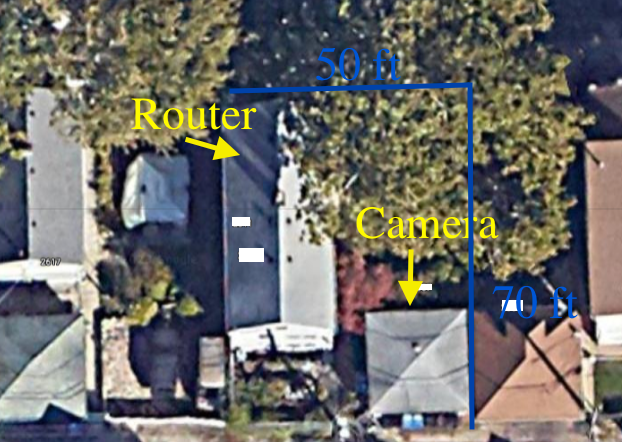
-
Allright, now it's connecting fine in the back porch on the other side of a closed door. I'm starting to think maybe there is something wrong with the antenna jack.
-
Well, unfortunately that didn't last long until it disappeared, and then came and went without rhyme or reason....I finally got time to try it with my powerline ethernet adapter and it's rock solid, so I think that's how it's going to be. Sawmill, I may use your idea of creating a way to run the wires under the eve somewhere. I could connect a wifi access point to the powerline ethernet but for right now this camera is my only outdoor connectivity need.
-
If the cam works with ethernet but not with its on-board WiFi, this device will probably work for you.
https://www.tp-link.com/us/home-networking/wifi-router/tl-wr902ac/
It does the WiFi for the camera. You would locate it at the camera, plug it in to the same power source as the camera, connect it directly to the camera with a short ethernet cable, and configure it in Client Mode.
The cam will think it's hard-wired, and you can turn off the cam's WiFi and remove its antenna.
This type of arrangement has fixed all the weak WiFi connections I was experiencing with my SV3C cameras.
I'm using eero devices for my cams, but I have one of these TP-Link devices and in my experimentation, it appears to work in the same way.
Looking at the pic you posted, I'd also extend the router signal to the side of the building the garage is on, possibly in the attic space, if there is one, and it's accessible. That extension could be either hard-wired (preferable) or WiFi. That would require a second device, which could be a second TP-Link unit.
All the above is offered based on my experience here, and not a guarantee it will work in your situation.
-
I finally got this wrapped up. Sawmill I took your suggestion and made a hole in the aluminum soffit and fed the ethernet cable into the garage, now plugged into the powerline ethernet adapter. It turns out the computer that I borrowed the powerline ethernet receiver from now connects fine by wifi due to the changes I made a year ago initially getting this camera to work (new router, repeaters) .... so no extra cost here.
Guess I'll never know what happened between June and November that resulted in the wifi problems, but it's nice having such a solid connection to the camera.
-
Good to hear you got it fixed. No cost is the best!

