TinyCam for Android - bandwidth usage

I'm using TinyCam on my phone to view cameras that I manage through SecuritySpy. In the SS "Camera Info" view I can see that the cameras are using H.265 and low data rate (on the order of 150KBps or less), but when I view them in TinyCam it's closer to 2-3MBps to my phone, and I'd like to reduce that.
TinyCam has 4 options for the protocol to use (JPEG, MJPEG, HTTP with H264/H265, and RTSP over TCP with H264/H265), but the only one that seems to work for me is MJPEG. Is there a way to make the others work? Or some other way to reduce bandwidth consumption without significant reduction in video quality?
Comments
-
SecuritySpy can't deliver the camera's stream directly to tinyCam; it has to be re-encoded. The format of the stream that is delivered to tinyCam is whatever is requested by tinyCam, and with the MJPEG option, the data rate will be very high. The best format to use here is H.264 over RTSP. If you can't get this working, perhaps you can post a screenshot of the settings you are using in tinyCam so that we can check them?
-
Well, the tinyCam settings are nothing unusual - Camera Brand=Mac, Model=SecuritySpy, Hostname is myname.viewcam.me, using port 8001....then I just use a different channel number as I add each camera. If those settings work for MJPEG, isn't it safe to assume that they should work for RTSP over TCP as well? Or do I have to change other items when I change the protocol?
-
As far as I know, if these settings work for MJPEG, they should also work for RTSP (H.264) too. What is the error you get when you switch to RTSP in tinyCam?
-
When I change to RTSP for any of the cameras (channels) the frame rate drops to zero and in about 5 seconds it says "Video failed (Timeout, check hostname and port number)". It behaves like it's not getting a response for RTSP at all.
-
Does it work for you?
-
Please download and install the latest beta version of SecuritySpy onto your Mac, replacing the version of SecuritySpy that you are currently using. This has some bug fixes related to sending RTSP streams via the web server. Does this resolve the issue? If not, we'll do some more testing here.
-
Thanks. I've installed 5.4.1b2 but unfortunately its behavior is the same.
-
What other tests should I try?
And again, can you reproduce this? The app is free to try...
-
Apologies for the late reply on this.
In my testing, I can switch between "Server push (MJPEG)" and "RTSP over TCP (H.264/H265)" and both deliver the correct video stream (i.e. the first one pulls the JPEG stream from the SecuritySpy server and the second one pulls the H.264 stream). The H.264 stream takes around 5 seconds to come up, but it does work for me.
I'm using tinyCam 15.3 which seems to be the latest - is this the version you are using?
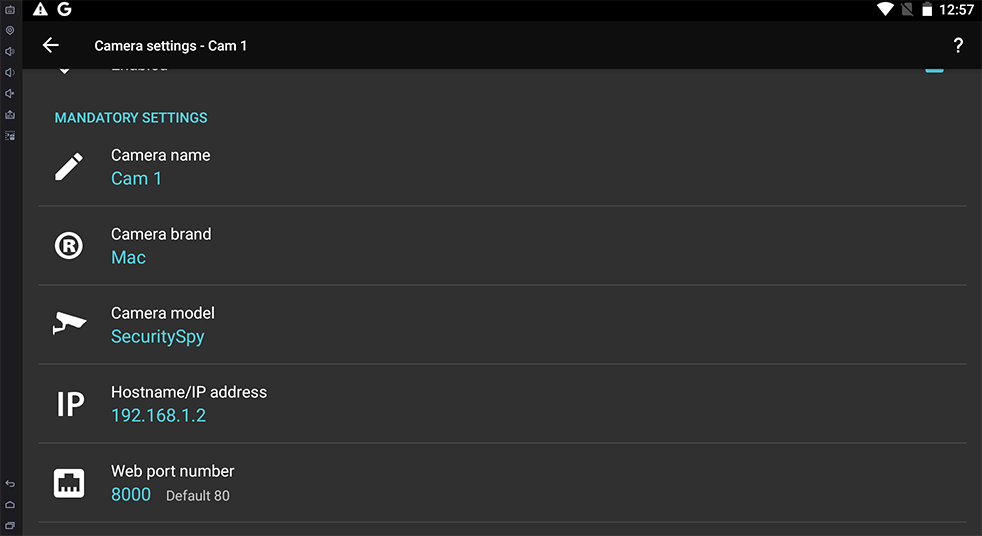
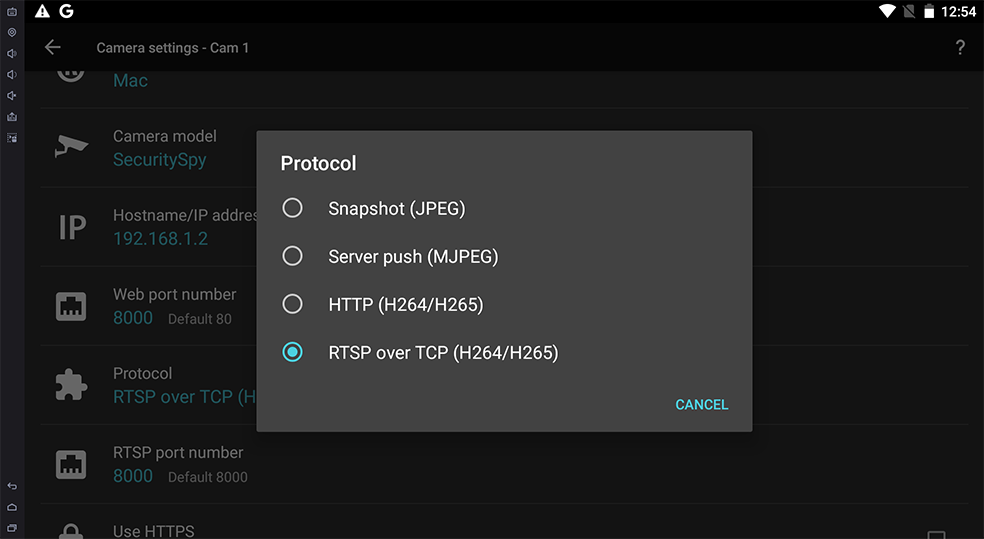
I'm attaching some screenshots of my settings below. Note that tinyCam has separate settings for the HTTP and the RTSP port numbers - these should both be set to the port that SecuritySpy uses (default 8000).

-
Thanks very much for your investigation. The only settings that are different for me (on the 15.3 version from the Google Play Store) are that I'm using a myhost.viewcam.me hostname and have https enabled. I've changed both of those to match your settings but it still only works on MJPEG.
I think I'll try getting a packet trace from the server side, though I think I did that already. Please let me know if there are any other logs that might shed some light on what's happening.
-
Interesting - it seems that SSL is the difference here. If I switch on SSL and switch to the HTTPS/RTSPS port (default 8001 for SecuritySpy), I get the same situation as you: MJPEG works but RTSP leads to a timeout error.
I've turned on logging on the server and this reveals that isn't not even seeing a connection attempt from tinyCam in this situation.
This looks to me like an issue with tinyCam. I will contact the developers to ask them if they can provide a fix - it might be worth you contacting them too.
-
Well, I'd be happy to do that but I'm not sure we're seeing the same thing. What I see is that MJPEG works whether I enable SSL or not, and RTSP fails whether I enable SSL or not. Is that what you see?
I have taken packet capture from my SecuritySpy server while I select RTSP from TinyCam, both with and without SSL. In both cases I see a request coming in from my phone and the server rejects the connection with a packet reset.
-
Bump?
-
Hi sot, I'm happy to do anything I can from SecuritySpy's point of view to get this working, but as far as I can tell at this point it's not an issue in SecuritySpy. My testing results to diverge from yours somewhat (for me, RTSP works as long as SSL isn't enabled) and I can't explain this, however from all that I've seen, nothing points to a SecuritySpy problem. I've tested RTSP streaming from SecuritySpy (the latest beta version I sent a link to above) in other applications (e.g. VLC) and there do not appear to be any issues. At this point it's not clear to me what further we can do here.
-
Well, since we're not observing the same behavior I think the only conclusion we can reach is that you're unable to reproduce the problem I'm reporting. I suppose it's possible that there's something different about my network, configuration, or even my cameras that could be responsible for that, and I'd appreciate your help gathering more information.
I did spend a little while trying to find another cam viewer for troubleshooting but none jumped out at me as a good candidate. If you know of one, please let me know. Besides that, can you please tell me how you're using VLC to test RTSP streaming on SecuritySpy?
