Weird configuration changes after power problems

Severe storms knocked out power yesterday afternoon, restored today mid-morning. Everything seemed to come back up OK in Security Spy, but no access to the browser interface.
Tonight another storm came through, some sort of power surge or interruption knocked out my router, then seemed to only affect the wireless radio, eventually got it all going after a reboot except for 2 cameras. Goofed around and ultimately found that both had been set to static IPs but somehow had become reset to Onvif profile. Used a few tools to figure out what their IPs had been and that did the trick. A while later I checked on the web interface problem and found the address had changed from 192.168.1.42:8000 to 192.168.1.35:8000.As far as I can tell nothing else about my system or apps is showing any strangeness.
Comments
-
Based on your description, it's difficult to know exactly what went wrong, but the possibilities are:
- The devices that changed weren't actually set to static IP addresses, so the change was simply caused by being power cycled.
- IP addresses were assigned by DHCP reservations in the router, and a power surge corrupted router settings. If you noticed any other settings changes in the router then that points to this possibility.
- IP addresses were assigned in cameras' own settings, and the power surge corrupted these.
Now that everything is back to normal, it's worth doing a quick audit of all devices and IP addresses, and setting up a comprehensive list of DHCP reservations for each device in the router.
It's unlikely that SecuritySpy's settings were corrupted - if the surge affected the Mac, you would likely see wider problems on the Mac, not SecuritySpy-specific.
-
Thanks, I only do static IPs at setup (in the camera's interface.)
Was wondering if the router took a hit, but things are mostly back to normal (except for one perpetually flaky camera that's going out of service when its replacement gets here.)
Why would the web interface access address change though?
-
If the IP address of the Mac changed, this indicates that the Mac is likely set to DHCP, which means that it gets an IP address from the router automatically. If the router isn't configured to provide the same IP address to the Mac each time (or if this setting got correupt/lost), then the Mac's IP address will change from time to time.
-
I think there's some miscommunication here perhaps. I'm referring to the address I have to type in to various devices to access the web interface to view my cameras.
-
Your original post above described the address to access your SecuritySpy system changing from 192.168.1.42 to 192.168.1.35. These IP addresses belong to the Mac running SecuritySpy, and since this is changing, it indicates that the Mac is set to use DHCP, rather than being assigned a static address. Under DHCP, the address is determined by the router, so can change from time to time unless further action is taken to fix it. The solutions are:
- Create a "DHCP reservation" in the router, so that the Mac gets the same IP address each time.
- Instead of using the IP address, use the Bonjour address (the one ending ".local") to access your SecuritySpy system from a different device. Go to Settings > Web, and click the "Access Info" button. Here you should see a URL in the form "http://address.local:8000 - this uses the Bonjour address, and will continue to work even when the Mac's IP address changes.
-
Thanks Ben. Bonjour address is http://Seven.local:8000. On my phone I get "site can't be reached" and it looks like it's changing the upper case S in Seven to lower case.
-
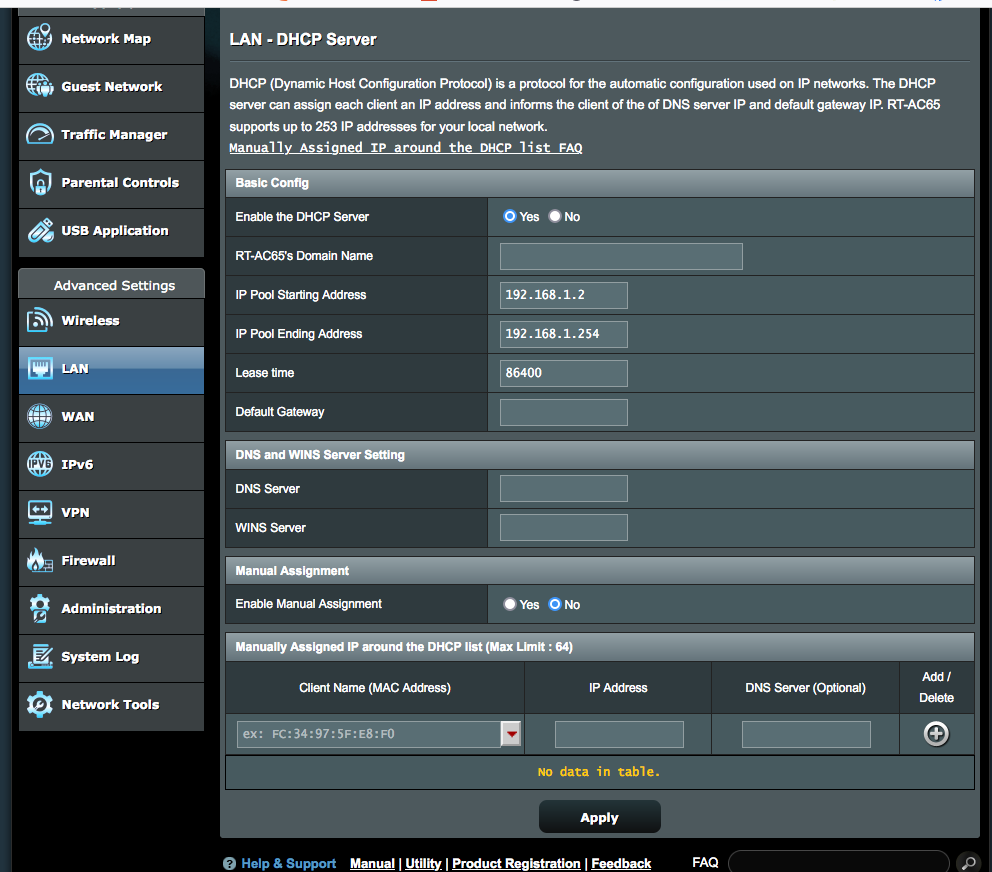
Is this where I create the DHCP reservation?