Feature request- clean up contextual menu

I've mentioned before but not sure where... still a frequent
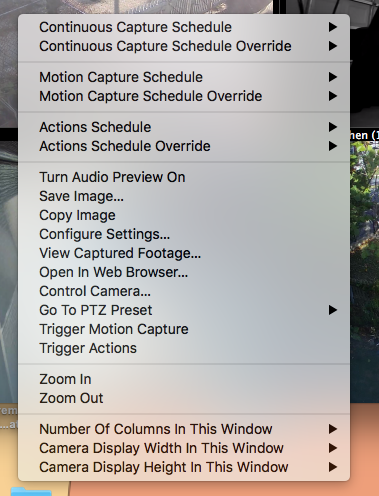
irritant.
Any way this could be reworked so that "configure settings" is not buried in a list of lesser needed options? It's pretty much the only one I go to every time, although I do like being able to disarm actions for an hour or 3 without digging e.g. when someone is working in the alley.
Comments
-
I agree that the order here isn't quite optimal - we've now rejigged this in the latest beta version of SecuritySpy (currently 6.16b6). The "Configure Settings" option is now second in its section, after "View Captures", which I think will be more frequently used by most users. I hope this helps you to locate this option more easily.
-
Yes that helps a lot, thanks! (Personally no use for view captures- just checked it out, might be useful if it offered better forward cueing or speed controls than VLC)
If I had my say "configure settings" would be top, followed by "control camera" and then there could be 20 more whatevers as I'd just ignore it all :-)
-
Out of that entire menu I too only use ‘configure settings’ and ‘control camera’ now that the arrow keys no longer PTZ and the PTZ buttons disappeared from the camera title bars.
i also use VLC to view captured footage for the exact same reason plus frame by frame seeking to read low light licence plates.
-
Hi @dmg15 - if you hold the Shift key, or engage Caps Lock, the arrow keys will work for PTZ as before.
Also, the PTZ buttons should still be in the title bar of any video window that contains a camera with PTZ functionality. If you're not seeing this, it points to a bug rather than a design decision that we made - in this case please email us and include screenshots to show us what you're seeing, and we'll look into this further.
-
Maybe "Configure Settings" and "Control Camera" could be made to stand out somehow in the menu? I find myself just scanning for "Settings" and the word configure seems to mask it somehow from easy scanning.
Also, much of the time shift/arrow doesn't work until you do it a second time.
-
All options in this section of the contextual menu are in the form "Verb Noun", so "Configure Settings" fits with this pattern - I can't really think of a way to make "Settings" stand out without breaking this pattern - what did you have in mind?
With the shift-arrow, that is surprising, as I can't see why it would require a second try. Can you please tell me 1. if this is reproducible every time, and 2. if you see any associated errors in the log (i.e. at the same time) related to PTZ control (File menu > Open Log).
-
Is there a way to bold a selection in the dropdown menu? The need to hit shift twice is apparently not consistent, I'll try t pay closer attention and check the log next time it happens. Seemed like most of the time.
-
Hi @nealk sorry but there is no way to bold specific items in the contextual menu.
Just to make sure I understand what you are saying about the shift-PTZ control: is this the Caps Lock button, and you have to hit it a couple of times for the little keyboard LED to engage? or is this the regular Shift key, whereby the first shift-arrow keypress doesn't work, but subsequent ones do?
-
Regular shift key. I can't remember ever intentionally using caps lock in my life. Happened today, had to let go of shift key and hit it again before camera would respond to arrows. Nothing in log.
