Any iOS updates coming?

It has been a pretty long time since any major upgrades to the SecuritySpy iOS app. And there are persistent bugs, such as full-screen camera views continually minimizing after enlarging them from the multiplex window which requires a force-quit to fix.
In addition to that, features have been pretty stale. Some features I would like:
- Ability to put a camera feed in a PIP window.
- An Apple Watch app.
- Ability to show the full video window of a camera for cameras with different resolutions in multiplex, instead of having them cropped.
- Proper split-screen for iPads.
The iOS software is currently pretty lacking and feels stagnant.
Another random feature of the Mac app I recently thought of that would be nice is the ability to "virtually" rebroadcast added cameras as ONVIF cameras for simpler integration with other software.
I love SecuritySpy, but the iOS app really needs some love in my opinion.
Comments
-
I don't think it's fair to say there haven't been any major updates for a long time - we released a major update earlier this year with some nice new features, including captured file sharing, display customisations, UI improvements, dark mode support, scheduling additions, and bug fixes.
Nor is it fair to say there are "persistent bugs". The current release is very stable and bug reports from users are extremely rare. The problem you mention with the camera views automatically minimising is a perplexing one - only one other user has reported this and as far as we can tell this isn't a bug in our app (though it could be - we are keeping an open mind while investigating).
Having said that, I do agree with you that more features could be addd, and I like most of your feature suggestions.
In terms of the multiplex cropping, it's either cropping or black bars, neither of which is ideal. But perhaps we could add an option to let the user choose between the two.
PiP and an Apple watch app would make great additions I think. A split-view iPad display would be nice but would require significant development effort that's perhaps best spent elsewhere.
The app is a continual work in progress - rest assured that we certainly plan to bring some great improvements to the app going forward!
-
In terms of the multiplex cropping, it's either cropping or black bars, neither of which is ideal. But perhaps we could add an option to let the user choose between the two.
Being able to choose between the two would be ideal. Sometimes I only want to multiplex two cameras on my iPad, but it's basically pointless due to the cropping. Sure, I could just multiplex 4 cameras, but I'd rather save the bandwidth and load on the server.
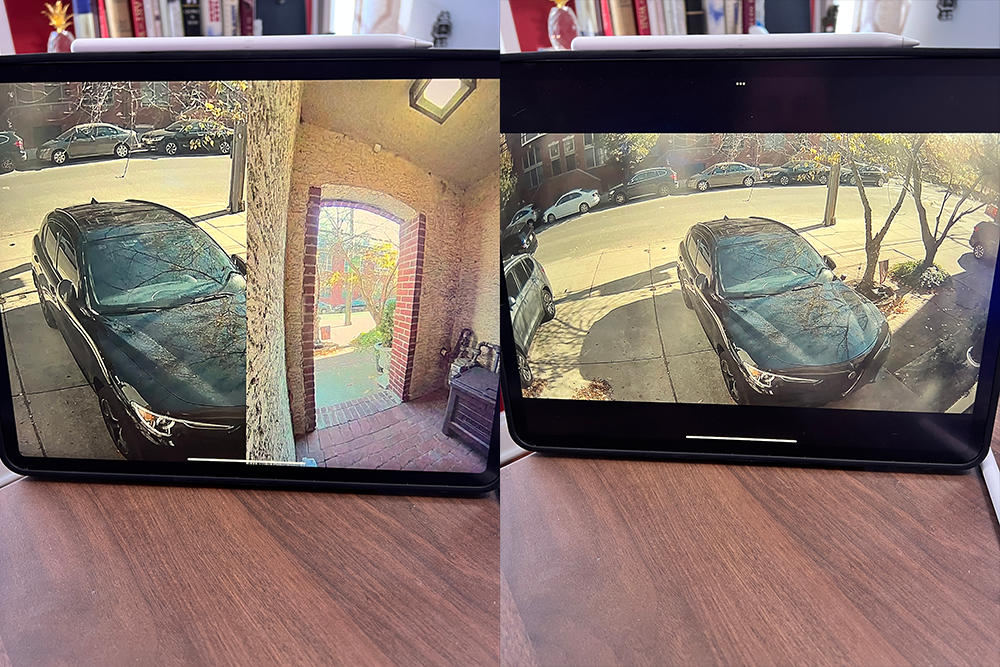
A split-view iPad display would be nice but would require significant development effort that's perhaps best spent elsewhere.
It turns out what I was asking for was already implemented. I just wanted regular split-view on the iPad, which SS already seems to work with. I swear I've tried to get it to work in split view and it hasn't. But iOS15 makes that much easier, so I must have been messing it up myself. However, it suffers from the cropping issue. My ideal would be SS on 1/3rd of the screen, with multiplex windows stacked on top of each other vertically like in the first photo of the preview window, but at the higher framerate multiplex provides.
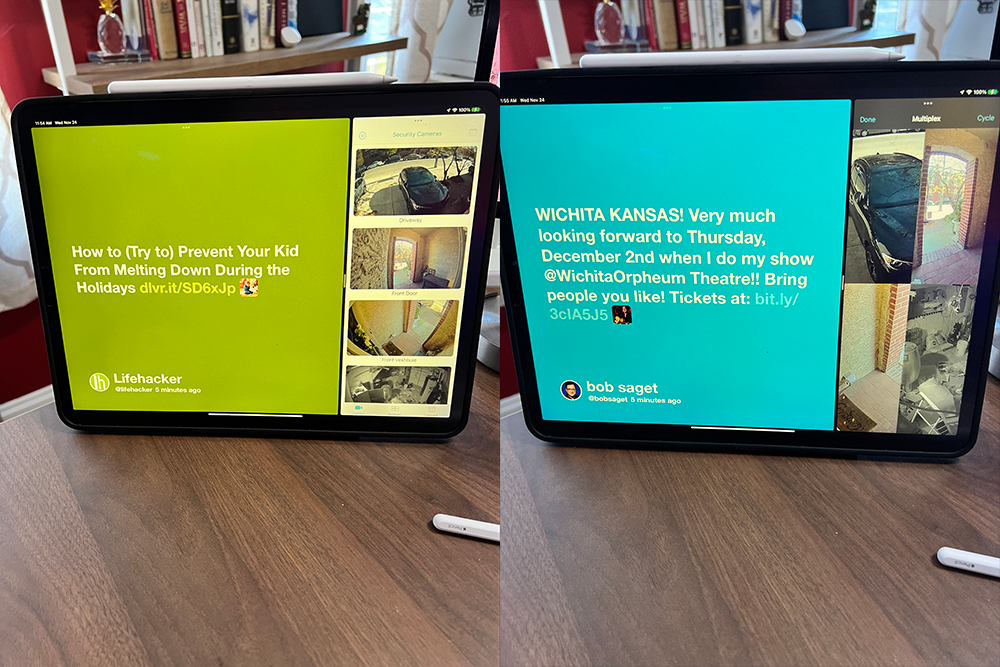
Also, there was one more simple (I think) feature I forgot about. Why isn't there an option to multiplex only the cameras in a certain group? Multiplexing seems to only work with all of the cameras and doesn't stick to the camera groups we set up in the desktop app and then select on the cameras screen in the iOS app. Seems like a no-brainer and much simpler than any of these other feature requests.
Didn't mean to come off as complaining too much. I love the app.
-
Thanks for the clarifications.
Good to hear that you were able to get the regular split-screen view working - yes SecuritySpy does support this. Sorry, I misunderstood your comment, I thought you were suggesting changes to the SecuritySpy app itself to have multiple views at the same time (e.g. live video next to captured files on one screen or something like that).
I agree with you that the multiplex layout and cropping isn't always ideal - it all depends on the aspect ratio of the cameras vs. the aspect ratio of the display, and the number of cameras chosen. Some combinations result in lots of cropping and a suboptimal display. We'll certainly have a look at this for the next update and make some improvements.
And an option to select a particular group vs. all cameras I think would be a good addition to the multiplex feature too, I've added this to the "to do" list.
-
Another vote for groups and security related to this. I'd like to be able to give people access to specific cameras without any way for them to see other cameras (and be confident that they'll not be able to) but have yet to be able to do this successfully w/ IOS or TVOS apps.
-
QFive - You can already do this easily. Just go to settings in the MacOS app, then go to Web:
You can make a new account and select which cameras (and other options) they can see. Then just use that new account to sign-in on the iOS and tvOS apps.
-
Hi Ben, I have an app feature request to make the UI more consistent and improve the viewing of recordings on an iPhone:
When 2-finger zooming-in on live cameras, the zoom state persists after letting go, and you can pan around with one finger in that zoomed state.
But when 2-finger zooming-in on recordings, the recordings pop back out to fully zoomed out as soon as you let go. This makes it impossible to first zoom in and then slowly scrub back and forth on a recording to check something out.
It seems like this would be an easy addition and would dramatically improve the ability to watch the recordings on an iOS device.
And of course my consistent request: PLEASE add an ability to disable notifications for a fixed period of time (1-hour?) in the iOS motion notification, exactly like Ring does for their notifications. It is so convenient to be able to turn off a cameras notification when there is known motion happening there without having to launch into the app, go into the notification setting for that camera, and override it for some period of time, and do so for each camera when it gets affected. I end up just turning off all SecuritySpy notifications as a work-around, but then forget to turn them back on, and end up missing notifications for a day before noticing. Big improvement opportunity, in my opinion!
Thanks Ben.
-
Hi @Mech33, thanks for your suggestions.
Zooming during movie playback: I think this is a good idea, and I understand why it seems like it should be easy to implement, but unfortunately it isn't. Our app uses the standard iOS movie playback mechanism provided by Apple, and this is quite inflexible with the features it supports and customisations it allows (almost none). So in order to add such a feature, we would have to write our own movie playback screen from the ground up, which is not an easy thing to do. So I think we're stuck with the current behaviour, at least for now.
Notifications: I agree that this would be a very useful addition. I'll see if we can add this to the next update.
-
@Mech33 On latest iOS version, I am able to do this already. When alert notification comes to your screen, slow swipe left and there's an option tab that appears, first option is mute for 1 hour. Very helpful for exactly what you describe.
-
@ben I have to admit that the zoom into playback feature is poor as is. I'd imagine you'd be able to recycle/buy another app's API without having to re-write yourself. As is, this is a pain point.
-
Hi @jimmyjohnson thank you for that information, it seems that this option is now built into iOS!
As for zooming during playback, I agree that this would be a nice feature to add. I'll see what we can do for a future update.
-
@Ben Thanks for considering the zoom during playback. It would make the app much more usable when zoomed in and trying to watch some portion of the video while scrubbing for activity. And @jimmyjohnson , awesome, thank you!
