Error performing motion capture for the camera "(camera name)"

Hello. I recently upgraded my drive on my mac mini to SSD. Since that upgrade I've bee receiving the following errors:
Error performing motion capture for the camera "(camera name)", motion capture mode has been unarmed. (71840,13)
It seems to keep repeating anytime there is motion, and it seems to happen with every camera.
Is it some kind of permission issue? For reference, I did a clean OSX install, then copied over my user directory from the old drive. I had to fix some directory permissions but all other apps appear to work perfectly.
I have tried moving the capture location to different directories on my drive, and that didn't fix it.
Any ideas?
Error performing motion capture for the camera "(camera name)", motion capture mode has been unarmed. (71840,13)
It seems to keep repeating anytime there is motion, and it seems to happen with every camera.
Is it some kind of permission issue? For reference, I did a clean OSX install, then copied over my user directory from the old drive. I had to fix some directory permissions but all other apps appear to work perfectly.
I have tried moving the capture location to different directories on my drive, and that didn't fix it.
Any ideas?
Comments
-
Yes, this is a permissions issue. Are you running OS X Yosemite or earlier? If so, open Disk Utility and do a repair permissions operation on the volume.
If that option is not available (e.g. you are running El Capitan or later), then Get Info in the Finder for your user directory, click the padlock icon to unlock the permission settings, set the permissions so that you (the currently logged in user) are allowed Read & Write access, click the gear button and select the "Apply to enclosed items" option. Like this: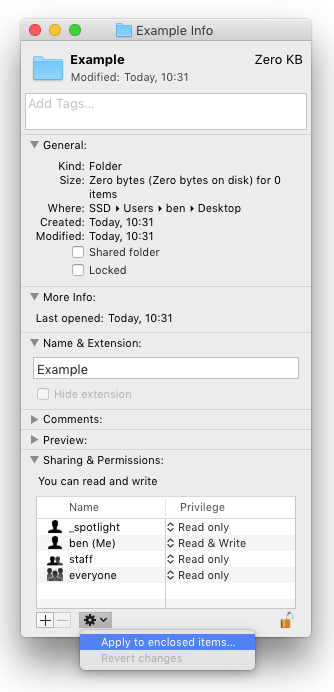
-
Bingo! I had done the appropriate permissions setting on the destination directory for the capture files but the security spy directory in my documents folder was not set appropriately.
Thanks!
I set permissions per directory rather than grabbing the entire user volume, but that wasn't the best idea... thanks again.
