using digital input port

See Forum February 2014: has implementing triggering of recording via the input ports of cameras be added to SS?
Specifically, for an AXIS P1425-LE network camera?
Specifically, for an AXIS P1425-LE network camera?
Comments
-
Yes, this has been implemented. If you are not using the latest version of SecuritySpy download and install it.
You'll find the settings to enable detection of the camera input ports in the Setup section of the Camera Settings window. -
I have 3.4.8 installed. Digital input port 1 is checked.
Is this how it should work: state of input port 1 is changed (e.g. grounded), camera signals SS to start recording as if SS had detected motion?
I've tried this every which way and whatever happens to port 1 is ignored. Otherwise, SS detects motion as expected. -
Yes that is how it should work. The digital input port is pin 3 on the I/O connector block. From the camera's manual:
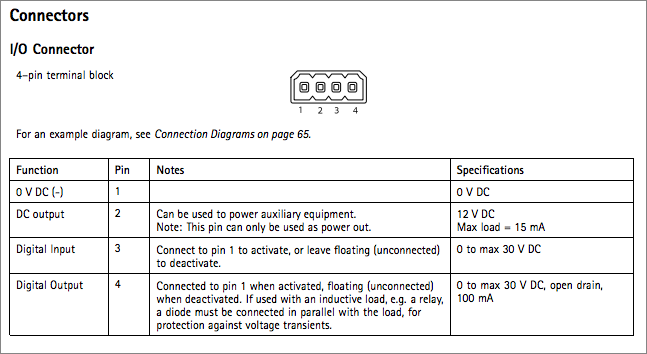
To trigger the input, connect pin 3 to pin 1 - is this what you are doing?
The camera must also be in Active mode, but if it's recording upon motion detection it sounds like it already is.
If you are still having problems, check the Log file, which you will find in the SecuritySpy folder within the Documents folder, for any relevant error messages such as "Event Input connection error". -
input pin 1 connected to pin 3.
No entries in log file for today.
Wave hand in front of camera. MD lites red. Video file saved on disk.
I have downloaded WaveShark--but never used it before. Could it be of any help?
-
Do you mean Wireshark? This is a very powerful packet sniffer that will tell you what is going on with the connection, though it's difficult to use. I think the best option would be for me to send you a special version of SecuritySpy that creates a log of the event input connection, so that we can see what is happening in terms of the communication to/from the camera. I'll email that to you shortly.
