Feature request: actions snooze button

Many times a day when I'm home I end up diving for the too long and too crowded contextual menu to disarm actions for a camera and a good percentage of the time I apparently select the wrong option because I have to do it again in a few minutes.
Can there just be a button on the camera window to pause actions for an hour with one click?
It will really help my blood pressure, thanks.
Comments
-
At the top of each camera's display in all video windows, you'll see the C/M/A icons - A stands for Actions. Click this and here you have easy access to schedules and overrides.
If you don't see this, go to Settings > Display and enable the "Info bar in video windows" item. Click the "Options" button and make sure the "Arming/recording status" item is enabled.
-
Not really feeling listened to here. I know I can get to this contextual menu that way but there are still way too many options to navigate and it's not always easy with a trackpad.
Also-- C/M/A all produce the same menu and I'm not really sure what I'm overriding. I want to pause the alerts but as far as I can tell I might also be pausing recording.
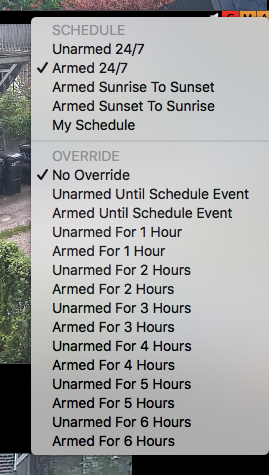
-
The reason I suggested this is that it's an easier way to set an override than the main contextual menu (right-click on camera), which it seemed that you were referring to in your original message.
There are a bunch of different override options here because they are useful - sometimes you want to mute just for an hour, but sometimes there is a longer event and you want to mute for 6 hours. Sometimes you might want to stop recording but not actions, or actions but not recording. These menus give you that in a form that's relatively easy to use. A specific standalone button for "mute actions for 1 hour" is too specific to be included in the user interface, sorry.
You mention this happens when you're home. It sounds like it may be useful to set up a set of schedules for when you're home (with actions disarmed so no alerts) vs. a set of schedules for when you're away (with actions armed). This is the purpose of the Schedule Preset functionality, so you might want to look at that as an alternative.
It's also possible to create a script to do what you want. Open Script Editor (you'll find it in your /Application/Utilities folder), and copy-paste this script:
tell application "SecuritySpy"
	set schedule override UnarmedFor1Hr camera name "Front Door" mode Actions
end tell
Make sure to substitute in the actual camera name. You could save this with file format "Application", perhaps to your Desktop, and/or drag it into your Dock for easy access whenever you need to mute notifications. This is basically the "one button" functionality that you wanted.
